
How to cancel a subscription you forgot you were paying for
Most subscriptions people still pay for are forgotten, not chosen. Here is how to find them, how to cancel properly, and the mistake that creates a debt.

Finance
Noria
Noria is the subscription manager app that adds up everything a household pays, flags price increases and tells you which subscriptions you can stop today.
Free with no cap on the number of subscriptions. Noria Premium is €3.99 a month or €24.99 a year for the alerts and the full household.
200 services
in the international catalogue, logos included
No cap
on subscriptions in the free version
7 currencies
EUR, USD, GBP, CHF, CAD, AUD, SAR
01 Where it started
On iPhone, Settings then Subscriptions lists what you pay through the App Store. That is useful, and it is a small slice of the problem. Netflix billed to your card, the electricity, the insurance, the phone plan, the gym, the newspaper: none of it shows up there.
Which means almost nobody knows their real total. Not an estimate, the actual figure that leaves the account every month. When I worked mine out by hand, I landed on a number I would not have guessed.
Noria answers one question, and everything else follows from it: what does a household really pay, and what can it stop.
The number nobody works out, because it is scattered across a dozen charges.
02 The total
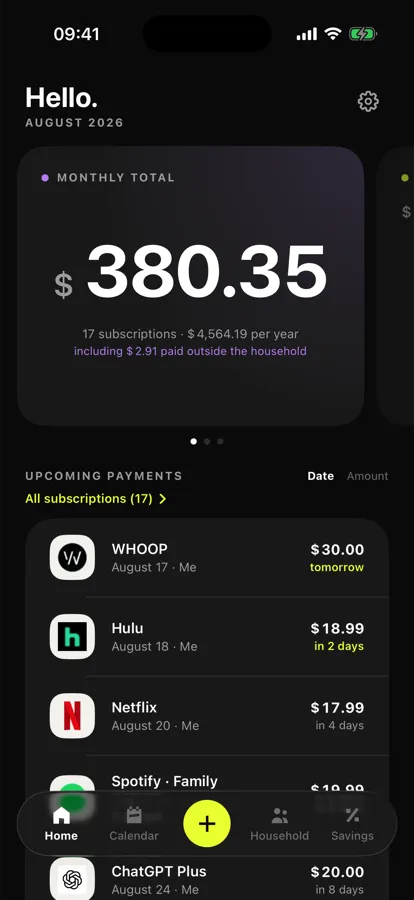
Monthly, yearly, the one that lands every four weeks: everything is converted to a monthly equivalent and an annual cost. One figure at the top of the screen, the detail right below it.
The international catalogue covers 200 services with their names and logos. Prices are not pre-filled there, because inventing a price would be worse than asking for it. In France the catalogue holds 218 services with their actual tariffs already in.
03 The calendar
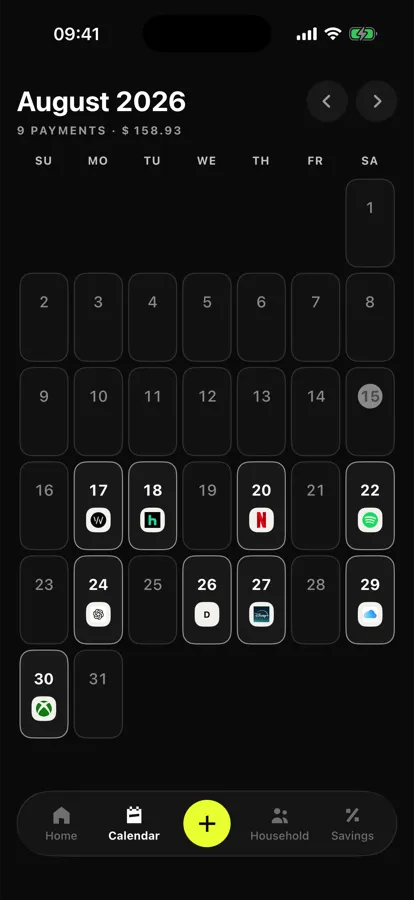
The whole month, every charge sitting on its date with the service logo. Tap a day for the detail.
It is the screen I open most, and it is not the clever one. It just answers a dumb, frequent question: what is going out before the weekend.
04 Savings
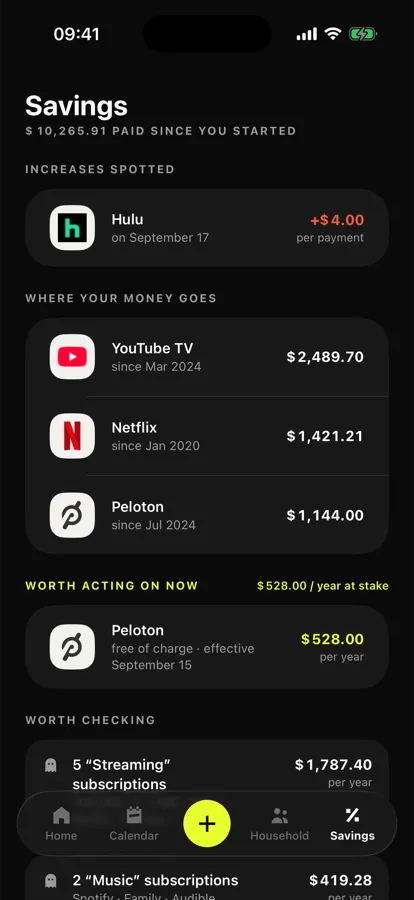
Two more euros next month has never made anyone cancel anything. Two thousand six hundred paid since March 2024 does. It is the one statistic on the savings screen that triggers a decision, so it is the one Noria puts first.
The rest of the screen follows the same order, from most expensive to least urgent: what is about to rise, where the money has gone since the start, what you can stop right now because the cancellation window is open, and duplicates within a single category. Duplicates are not a recommendation, just a question asked with the annual figure next to it.
Two more euros a month convinces nobody. Two thousand six hundred since March 2024 does.
05 Increases
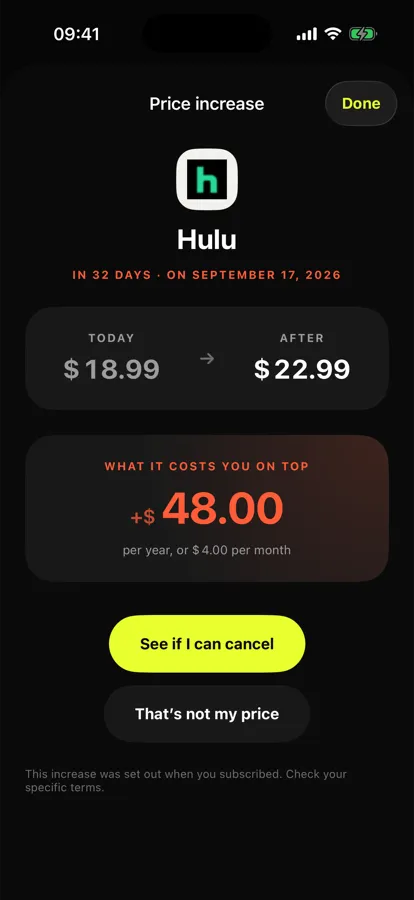
When a tariff moves, Noria shows the amount before, the amount after, the exact date, and above all the extra cost over twelve months. Going from 29.99 to 39.99 is not ten, it is a hundred and twenty a year.
Detection works on what you actually pay, never by comparing against a public price listed somewhere. And only two actions are offered: check your cancellation rights, or correct it if that was not the right tariff.
06 The household
A family plan shared between four people does not always split four ways. Noria takes uneven shares and works out what each person genuinely costs within the household total.
Each profile gets its own gradient, picked from a different stretch of the colour wheel so they stay tellable apart on a dark background. Past six people it starts over, because a seventh shade would be indistinguishable.
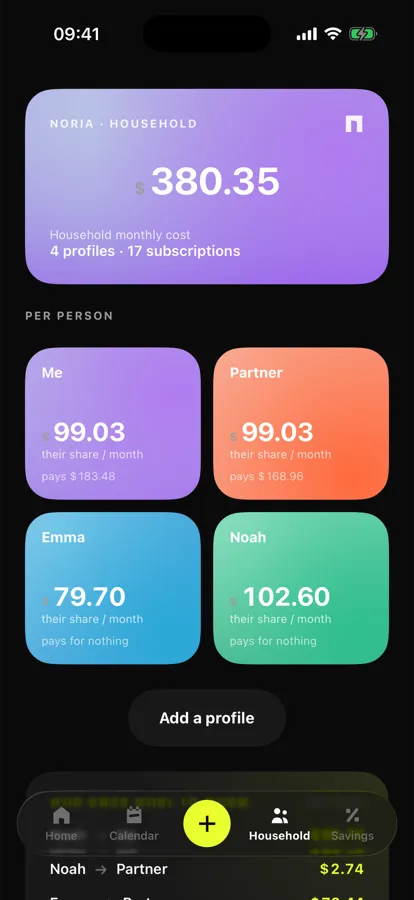
07 Settling up
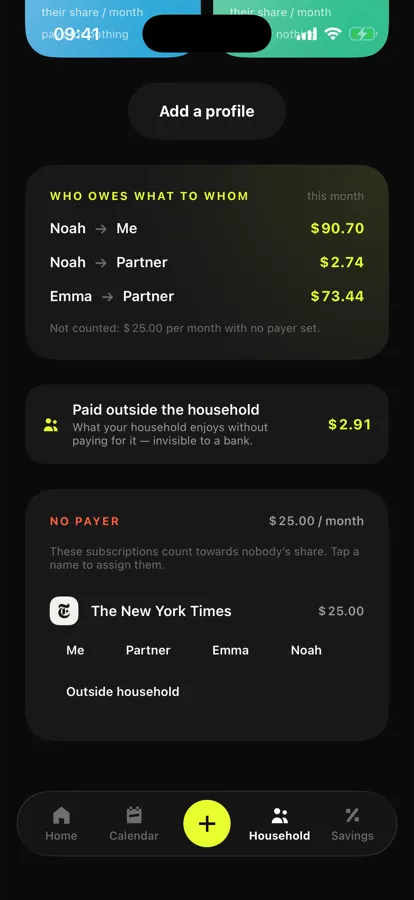
Who owes what to whom. The app works it out, and more importantly it states what the calculation does not cover: subscriptions with no assigned payer, and what the household uses without paying for it, like the account a grandparent gifted.
Being upfront about those blind spots matters more than the precision of the result. A calculation that claims to cover everything gets contradicted by the first edge case, and loses its credibility for good.
Monthly, yearly, every billing frequency folded into a single figure at the top of the screen.
Every payment on its date, with the service logo and the detail one tap away.
The cumulative amount already spent per subscription, the argument that actually triggers a cancellation.
The amount before and after, the date, and the extra cost over twelve months.
Uneven shares supported, plus a clear statement of who owes what to whom.
The file is parsed locally. Nothing is uploaded and no bank connection is ever requested.
Two things are still open before release, and I would rather write them down than discover them in the reviews.
The first concerns Saudi Arabia, where iOS renders dates in the Hijri calendar while a bank statement there is Gregorian. Respect the region setting or match the statement: both are defensible, and I have not settled it.
The second is the notification permission prompt, which currently appears on first launch, before anyone has seen any value at all. That is doubly clumsy, because alerts are a Premium feature. It needs to move to the moment somebody turns on their first alert.
Noria has no account, no server and not a single tracker: your subscriptions and your bank statement never leave your iPhone. What stays on the device, what iCloud does with it and how to erase everything is set out in the Noria privacy policy. The rules of the service, what is free, what is paid and who answers for what are in the terms of use and legal notice.
For knowing a household's real total and deciding what to stop. Noria adds up every subscription whatever its billing frequency, shows how much each one has already cost you, flags price rises and points out the ones whose cancellation window is open.
Yes, and that is the whole point. iPhone Settings only shows what Apple bills. Noria also covers what is charged to your card or account, such as electricity, insurance, your phone plan or the gym.
From what you actually pay, by comparing charges over time. Noria never compares your tariff against a public price listed elsewhere, which would be wrong half the time.
No. The file is parsed on your iPhone and nothing leaves it. Noria never asks to connect to your bank.
The free version has no cap on subscriptions and includes the total, the calendar, statement import, the running total, duplicates and the first household profile. Noria Premium, at €3.99 a month or €24.99 a year, adds the three families of alerts and the full household.
Noria requires iOS 17 or later.
Download
Noria is on the App Store.