How many push ups a day you should actually be doing
How many push ups a day is the wrong question until you know your max. Here is how to work out your volume from it, and why form matters more than the count.

Health and fitness
Reptor
Reptor is the push-up counter app that sits on the floor, counts the clean reps through the camera, refuses the rest, and builds a training plan on top.
Counting and judging every rep is free with no time limit. Reptor Pro adds the adaptive plan, at €4.99 a month, €39.99 a year, or €79.99 once, for life.
90°
the depth threshold, taken from published standards rather than an opinion
6 variations
from the knee push-up to the decline, all judged by the same engine
0 servers
no account, no analytics, nothing is ever sent to me
01 The starting point
I spent months trying to track my push-ups by hand. You lose count somewhere around the fifteenth, you count a rep that only went halfway down because your arms are burning, and three weeks later you no longer know whether you have improved or simply lowered your standards without noticing.
Existing push-up apps don't fix that. They ask you to type a number in at the end of the set. So the figure is exactly as honest as the person typing it, on a tired evening, after a day at work.
Reptor measures instead of asking. You put the iPhone on the floor, you do your push-ups, and the app counts the ones that deserve to be counted.
An app that takes your word for it teaches you nothing. This one watches.
02 The counting
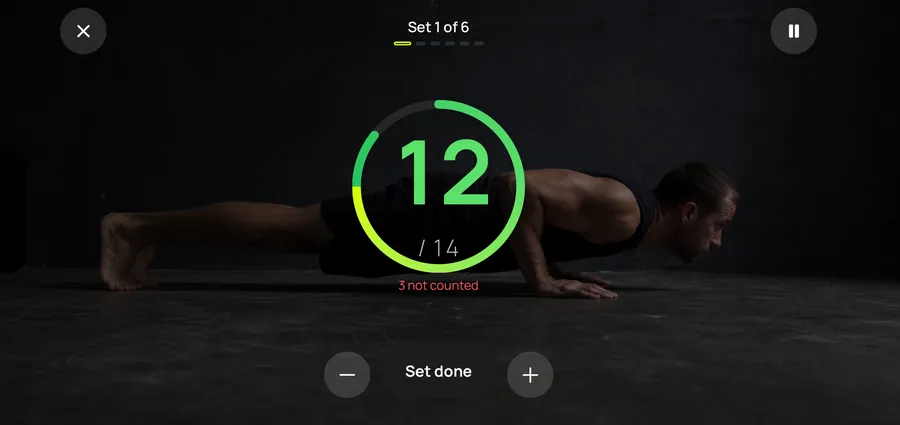
You put the phone on the ground two steps away, slightly to the side so it sees the profile of your body, and you start. Reptor tracks your joints in real time and calls out every valid rep, which saves you craning your neck to look at the screen halfway through a set.
Everything happens on the device. No video is recorded and no image is sent anywhere: each frame is analysed then thrown away immediately, and only the joint positions feed the calculation.
The session screen adds the cues that matter at the moment they matter. In the screenshot the hips are sagging, and the app says so straight away, during the set, while it can still be corrected.
03 The judging
A push-up counts if it goes low enough and if the arms lock out fully at the top. Those are two conditions, not one, and it is the second that kills the most reps at the end of a set.
The criteria don't come from my own opinion. The US Army APFT asks you to go down until the arms are at least parallel to the ground, the FitnessGram talks about a 90 degree push-up, and incomplete extension invalidates a rep in both. Reptor applies those thresholds.
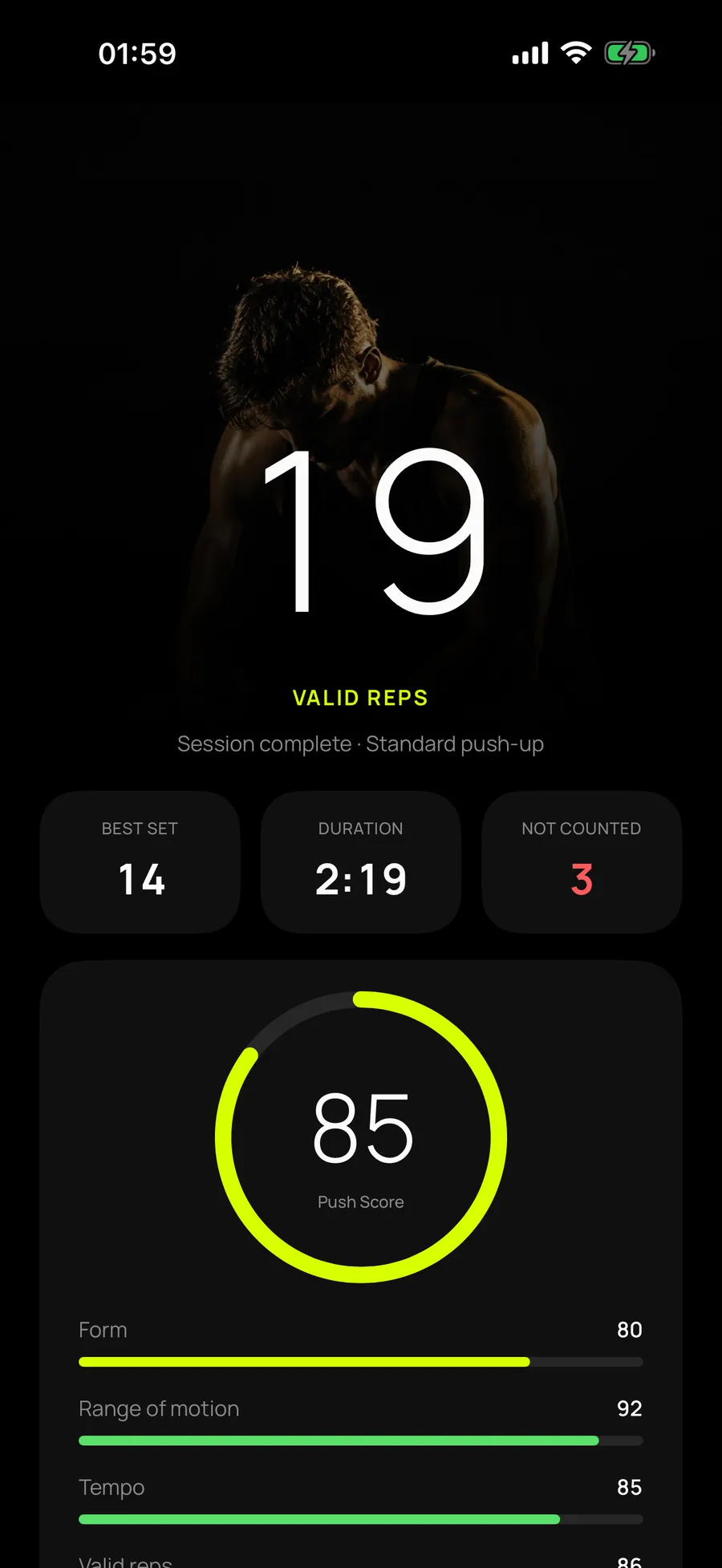
The summary always shows both figures, the validated count and the detected count, with the gap between them. On this session, twenty-one valid reps and four refused. So you always know why the total isn't the one you had in your head.
The Push Score out of 100 breaks the session into three: form, meaning body alignment, depth, meaning how far each rep travels, and consistency, meaning how steady the tempo stays. A score going down while the count goes up is the most useful thing on the screen.
A counter that inflates the numbers feels good for five minutes. A counter that refuses makes you better.
04 The plan
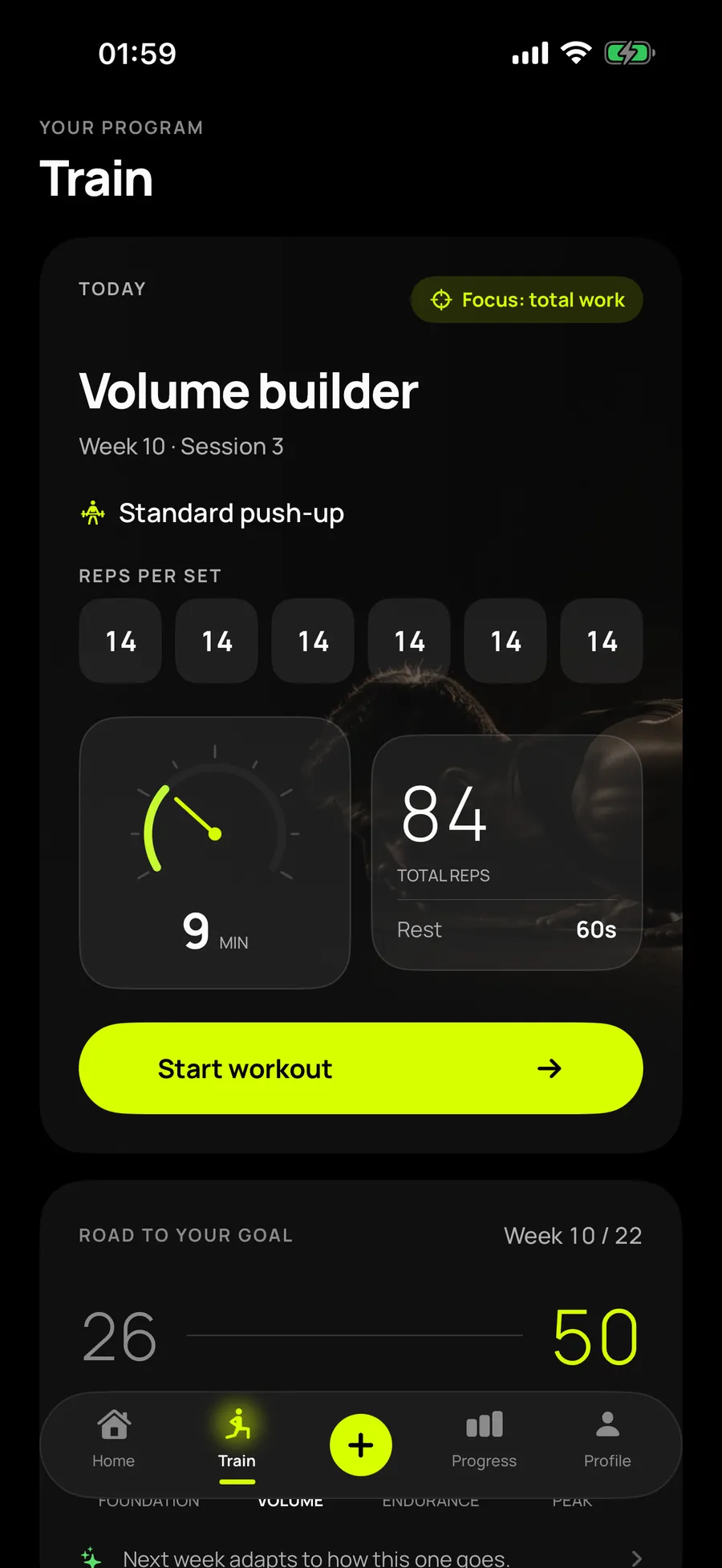
It starts with a measured test, not a questionnaire. After that the plan recalculates following every session: volume, intensity, rest and tempo move according to what the camera actually counted, not according to what was scheduled the week before.
A bad week triggers a lighter load, not a punishment. That is the point I pushed hardest on, because it is exactly where most training plans break: they keep demanding the scheduled progression, and you end up quitting rather than missing a target every week.
The plan also pauses itself for as long as you report joint pain. It doesn't offer to carry on more gently, it stops.
05 The progress
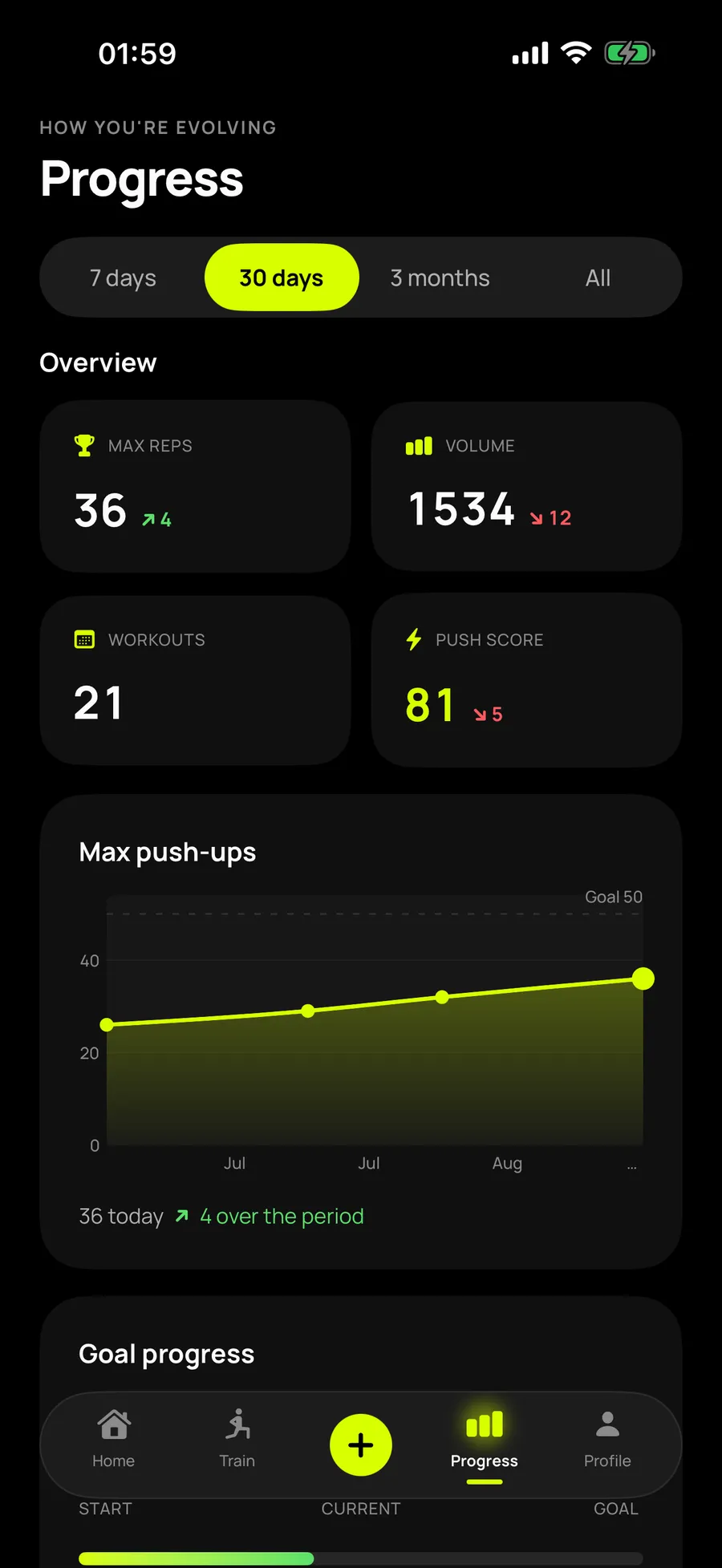
The progress screen shows your validated maximum climbing towards your goal, your weekly volume, your records and the full history of your sessions.
The maximum curve only moves on a max test. An ordinary session doesn't touch it, however good it was, because a well-run training plan doesn't take you to failure every week and a curve that rose after every session would be a curve that lies.
The Push Score shows up here too, and it sometimes falls while the volume climbs. That is normal: as sets get longer, form degrades towards the end. Seeing both together is worth more than seeing the flattering number on its own.
06 The variations
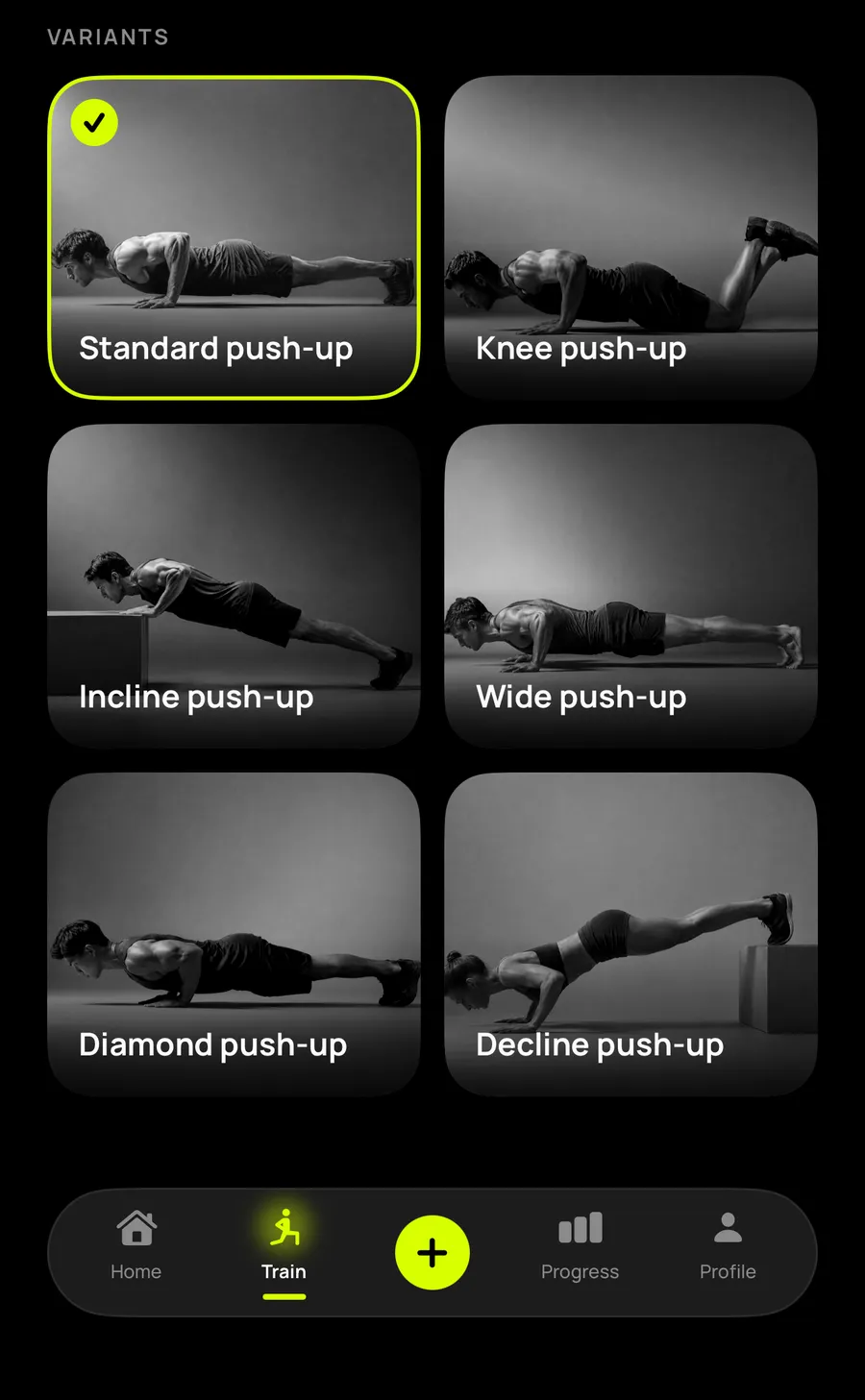
The engine can judge six movements: the standard push-up, knee, incline, wide, diamond and decline. Each has its own angle thresholds, because a diamond push-up doesn't travel like a wide one.
The two regressions, knee and incline, exist to make the movement reachable when you are genuinely starting from zero. That is the part push-up apps most often skip, even though it is exactly where people give up.
The progressions do the opposite, for when bodyweight no longer creates any difficulty and adding reps only makes the session longer.
07 Two ways in
On the second screen, Reptor asks what you are after. "Just count my push-ups" gives you the counter alone, free, with no time limit: you start a set whenever you want, the app counts and judges, you handle the rest.
"Build me a plan" asks a few questions, runs a measured test, then generates the adaptive plan. That is the paid part, and it is announced as such before the first question rather than discovered at the end of the flow.
You can switch at any time. Nobody is locked into the box they ticked on day one.
08 The widget
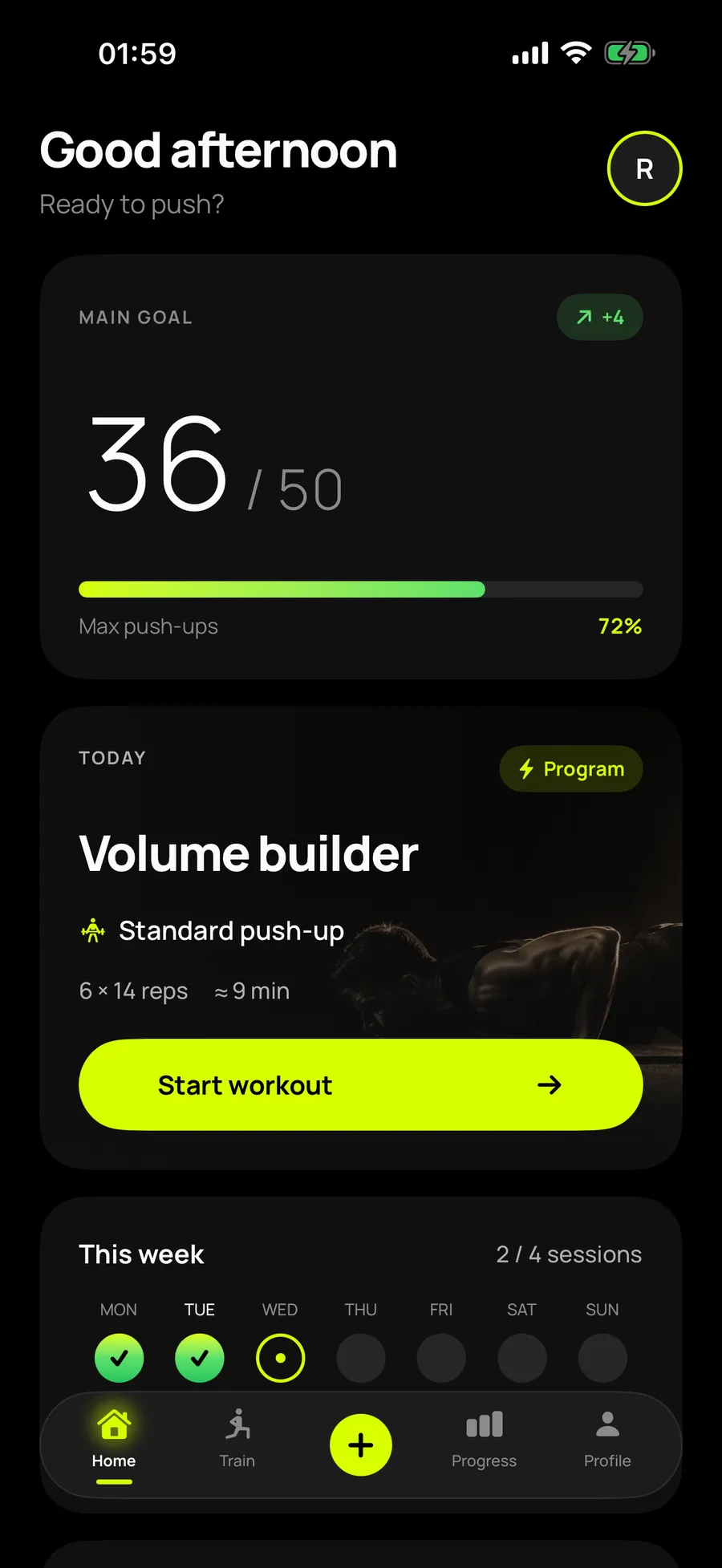
Reptor has a Home Screen widget. It shows a short summary: your sessions this week and the next planned session, enough to know where you stand without launching the app.
That summary never leaves the iPhone. The app leaves it in a space shared with its own widget, on the device, and the widget reads it from there. Nothing goes out: no server, nothing sent, and nothing passes through me.
09 Apple Health
It is an optional feature, set in the Profile. Once on, Reptor writes a workout to Apple Health for every completed session: the activity type, the start and end time, and an estimate of the energy burned if you entered your weight.
Writing goes one way. Reptor reads nothing from Apple Health, and nothing passes through me: it all happens on the iPhone, through the system. Your sessions join the rest of your activity in the Health app, with no extra app to open.
You stay in control. The permission can be withdrawn at any time in the Health app, which also lets you delete the workouts that were written.
10 The leaderboard
The leaderboard goes through Game Center, Apple's game service. It is only active if you choose to join it, on the leaderboard screen, after an explanation of what is shared.
What is sent comes down to two numbers: the repetitions the camera validated this week, and your best single session, in two categories, standard push-ups and easier push-ups. They are not numbers typed in by hand, they are the repetitions the app judged clean.
Your scores appear under your Game Center name. Your age, weight, sex and session details are never sent, and Reptor still has no server: Apple runs the leaderboard. You can leave it at any time, and Reptor then stops sending your scores. Those already published stay in Game Center until you reset them in its settings. A Game Center account that Apple flags as a minor's cannot join.
No video recorded, no image sent. Frames are analysed and then thrown away.
The gap between the two figures is shown, never hidden to produce a nicer total.
A missed week reduces the next week's load, and reported pain puts the plan on hold.
No server, no analytics, and nothing is ever sent to me.
Two optional features, off until you turn them on. They go through Apple, never through me.
This week's sessions and the next session, read on the iPhone, with nothing sent anywhere.
Reptor is not a medical device, and makes no claim to judge whether your joints are fine. It knows whether an elbow locked out or not, and that is all.
It is not a counter that inflates the numbers to please you either. That is a deliberate choice and it costs something: for the first few days the total on screen is lower than the one you were counting in your head. Three weeks later the opposite becomes the motivating part, because the number going up is a real number.
Finally, it is not an app that sends me your data. There is no server behind Reptor, no analytics, no account to create. Two optional features, which you turn on yourself, take part of your results out to Apple: a copy of your sessions in Apple Health, and your scores on the Game Center leaderboard. Nothing ever goes through me. That isn’t a marketing promise, it is simply the architecture: there is nowhere to send anything to me.
Reptor isn’t on the App Store yet. The counting engine and the training engine are in place, the plan recalculates correctly session after session, and what remains is mostly fine tuning the thresholds for each variation.
When it ships it will speak French and English. This page will be updated that day, with the download link where this sentence is.
Reptor has no server, so nothing it knows is ever sent to me. Apple Health and the Game Center leaderboard, two optional features, go through Apple. What it records, what becomes of every camera frame, and the two buttons that erase all of it are set out in the Reptor privacy policy. The rules of the service, what is free, what Pro unlocks and the legal notice are in the terms of use.
Through the camera. You put the iPhone on the floor two steps away, slightly to the side, and the app tracks your joints in real time to recognise the descent and the lockout. Nothing is recorded: frames are analysed then discarded, and only the positions feed the calculation.
Because they didn't go low enough, or because the arms didn't lock out at the top. Both conditions come from published standards, the US Army APFT and the FitnessGram, and the screen shows the validated count, the detected count and the gap between them.
No. No video is recorded or sent. The app has no server, no analytics and no account to create. Only two optional features, which you turn on yourself, take results out of the app: Apple Health and the Game Center leaderboard. They go through Apple, never through me.
Yes, a Home Screen widget. It shows a short summary, your sessions this week and the next session. That summary stays on the iPhone, in a space shared between the app and its widget, and does not leave it.
Yes, if you turn it on in the Profile. Reptor writes one workout per completed session, with the start and end time and an estimate of the energy burned if you entered your weight. It reads nothing from it, and you can withdraw the permission at any time in the Health app.
Yes, through Game Center, and only if you choose to join it. It compares the repetitions the camera validated this week and your best single session, in standard push-ups and easier push-ups. Your age, weight, sex and session details are never sent.
No. Counting and judging every rep is free with no time limit, along with the standard push-up, the knee push-up, the incline push-up, free sessions and the timer. Reptor Pro adds the adaptive plan, unlimited history and the extra variations.
€4.99 a month, €39.99 a year, or €79.99 as a one-off lifetime purchase. Both subscriptions include a seven day free trial, and the lifetime option never renews.
An iPhone running iOS 18, camera access, and about two metres of space so the phone can sit on the floor at the right distance.
No, it is not a medical device. The plan pauses for as long as you report joint pain, but that is a safeguard, not a diagnosis.
Coming soon
Reptor is coming very soon.