
Web app · Video
Noterz
Noterz, video review and approval software where clients comment shot by shot
You send a link. Your client, who is not an editor, comments on the film shot by shot, with no account. Their feedback becomes an edit plan to tick off and markers in Premiere Pro, DaVinci Resolve or Final Cut Pro, all the way to a signed delivery sign-off.
Free, no card required. Your clients never pay.
-
1 frame
of precision: every comment is anchored to an exact frame number
-
0 accounts
to create for your clients, who never pay
-
37 s
to detect the shots of a 21-minute film
-
3 editors
Premiere Pro, DaVinci Resolve and Final Cut Pro (beta)
The product film
Noterz in 52 seconds: from link to delivery sign-off
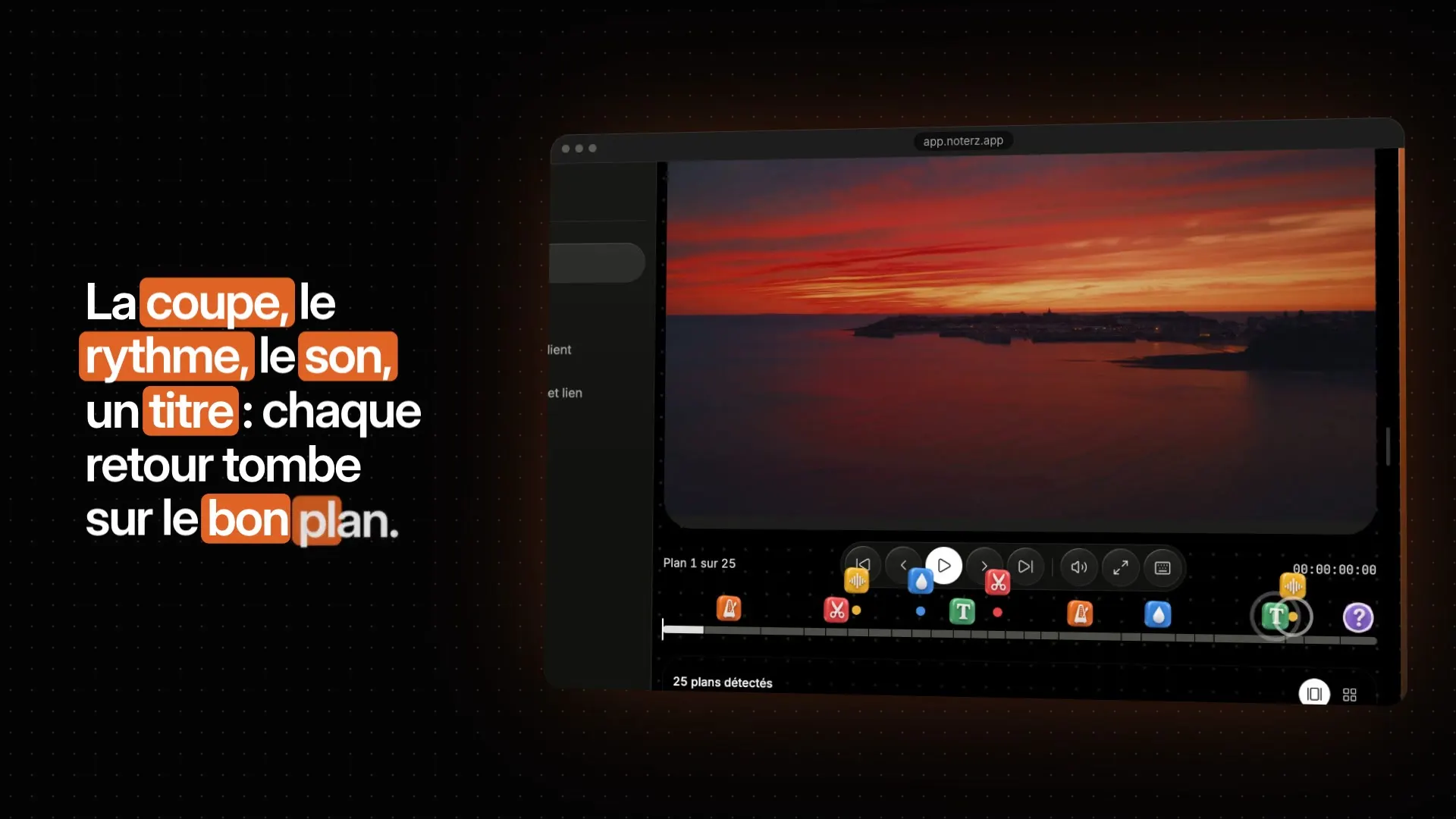
A short film, from sending the link to the signed delivery sign-off.
Where this started
A client's feedback shows up everywhere except in your timeline
Today, an editor gets feedback from clients:
- scattered across emails, WhatsApp and voice messages;
- with rough references, like “around 1:24, the part with the music”;
- to interpret, then to clarify with yet another email;
- as conflicting opinions from several people, discovered mid-edit;
- and approved by an “ok” lost in an email thread.
You spend more time understanding feedback than applying it, and revision rounds overrun the quote without anyone seeing it coming.
| Without Noterz | With Noterz | |
|---|---|---|
| The feedback | Scattered across emails, WhatsApp and voice messages | In one place, on the video, sorted by type |
| The moment it refers to | “Around 1:24, the part with the music” | The exact frame and its shot, all the way into your markers |
| What the client means | A text to interpret, then an email to ask | Annotated on the frame; if it is vague, the AI asks them |
| Several reviewers | Conflicting opinions discovered mid-edit | Flagged before you start |
| The approval | An “ok” lost in an email thread | A signed, dated delivery sign-off |
Four steps, from link to delivery sign-off
-
Send the link
Import your film: shots are detected automatically. The link goes out under your brand, with a password if you want one.
-
Your client comments
On their computer, with no account: they pause, pick a type of feedback, write, draw on the frame or record their voice.
-
You fix
When the round closes, the AI sorts the feedback shot by shot into tasks to tick off. The tasks go out as markers in your editing software.
-
They approve and sign
They compare V2 with V1, approve each fix and sign the delivery sign-off. The final film is then ready to download.
On the client side
Video review and approval software built for clients who are not editors
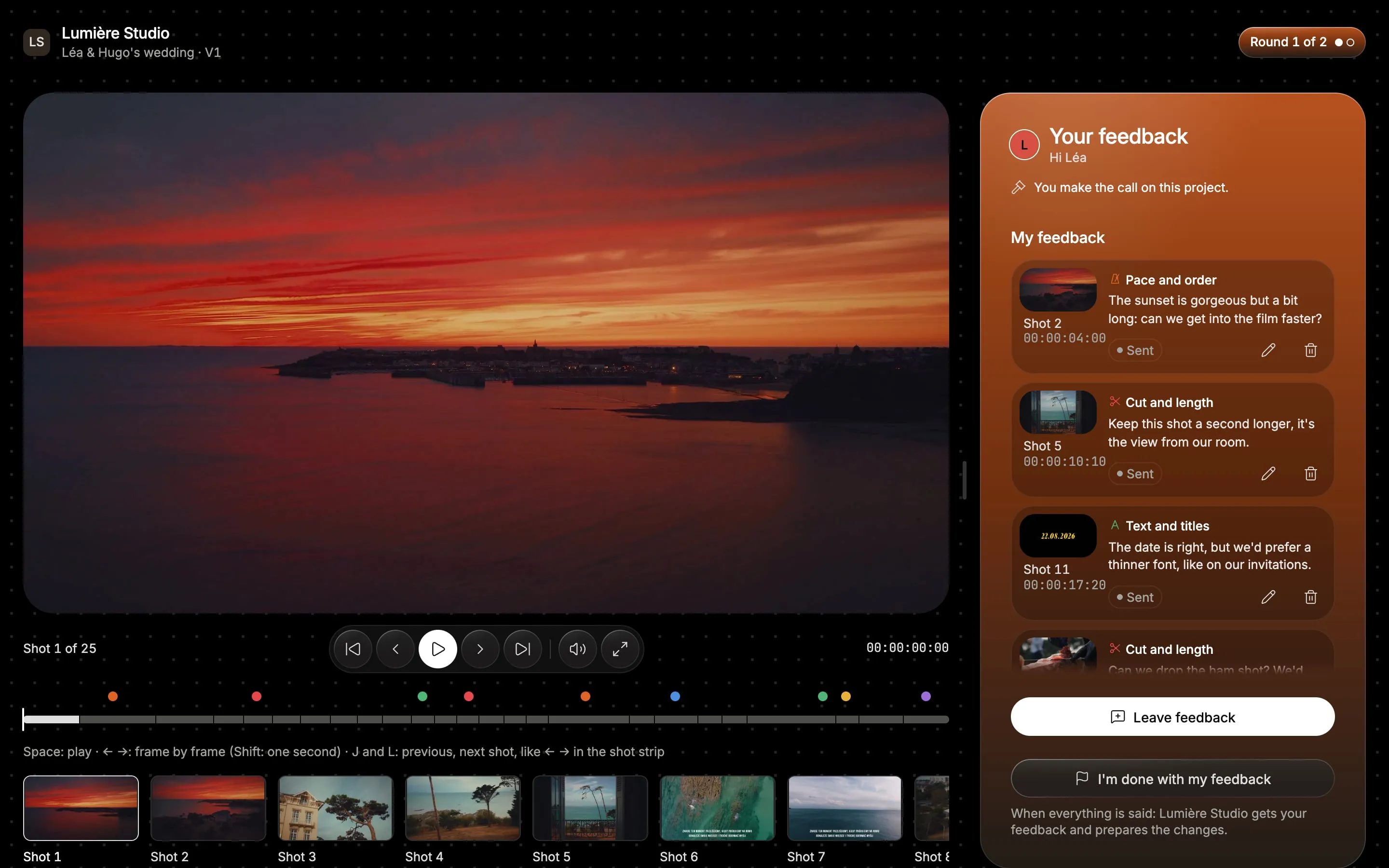
The film opens in the browser, with no account and no app. Your client types their first name and leaves a first comment within seconds. A password on the link is possible, but not required.
Each comment is anchored to an exact frame number, whatever the browser, and attached to its shot. That is what makes feedback usable: no more “around 1:24”.
- Six types of feedback, each with its details and an intensity: cut and length, pace and order, music and sound, text and titles, colour and image, other.
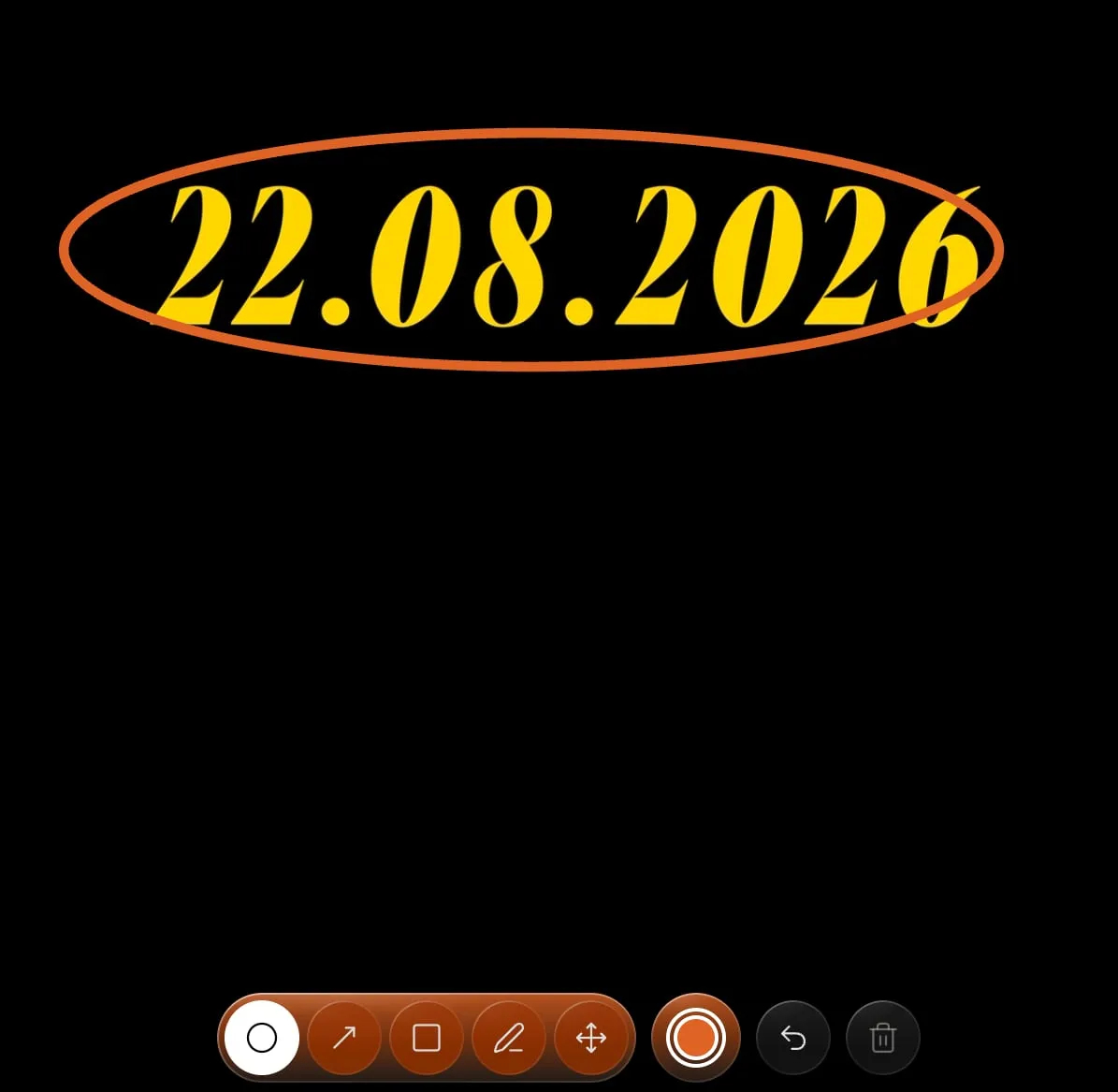
- Drawing on the frame: the client circles, points or underlines what should change.
- A voice note attached to the comment, for those who would rather talk.
- An offline queue: with no signal, the comment waits to be sent, with no duplicates.
- “My feedback”: they reread, edit or delete their own while the round is open.
- Several reviewers on the same link: each sees the others' comments and can say if they agree. The decision-maker ends with “I'm done”.
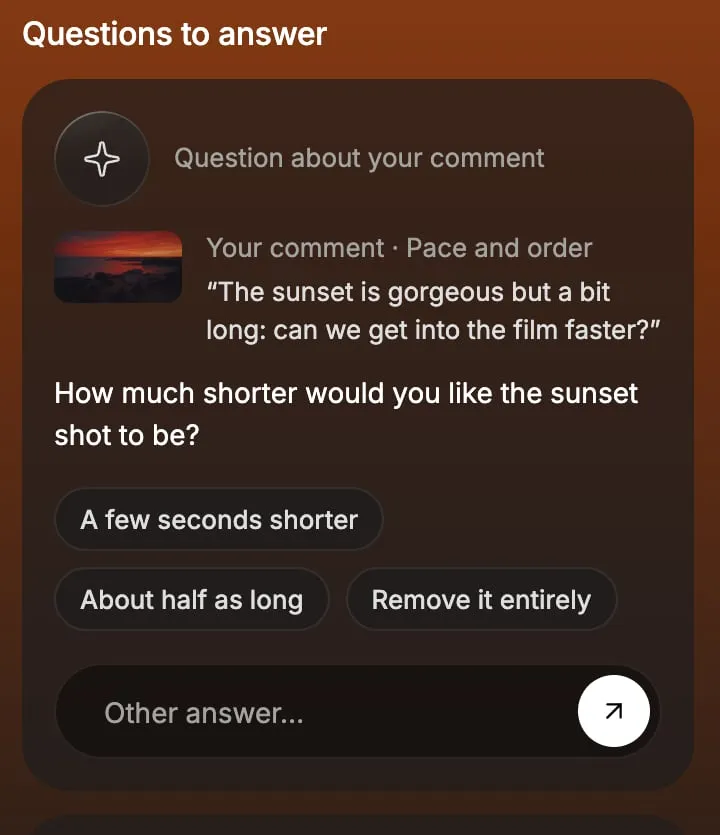
- AI questions when a comment is vague, with answers to tap.
On the editor side
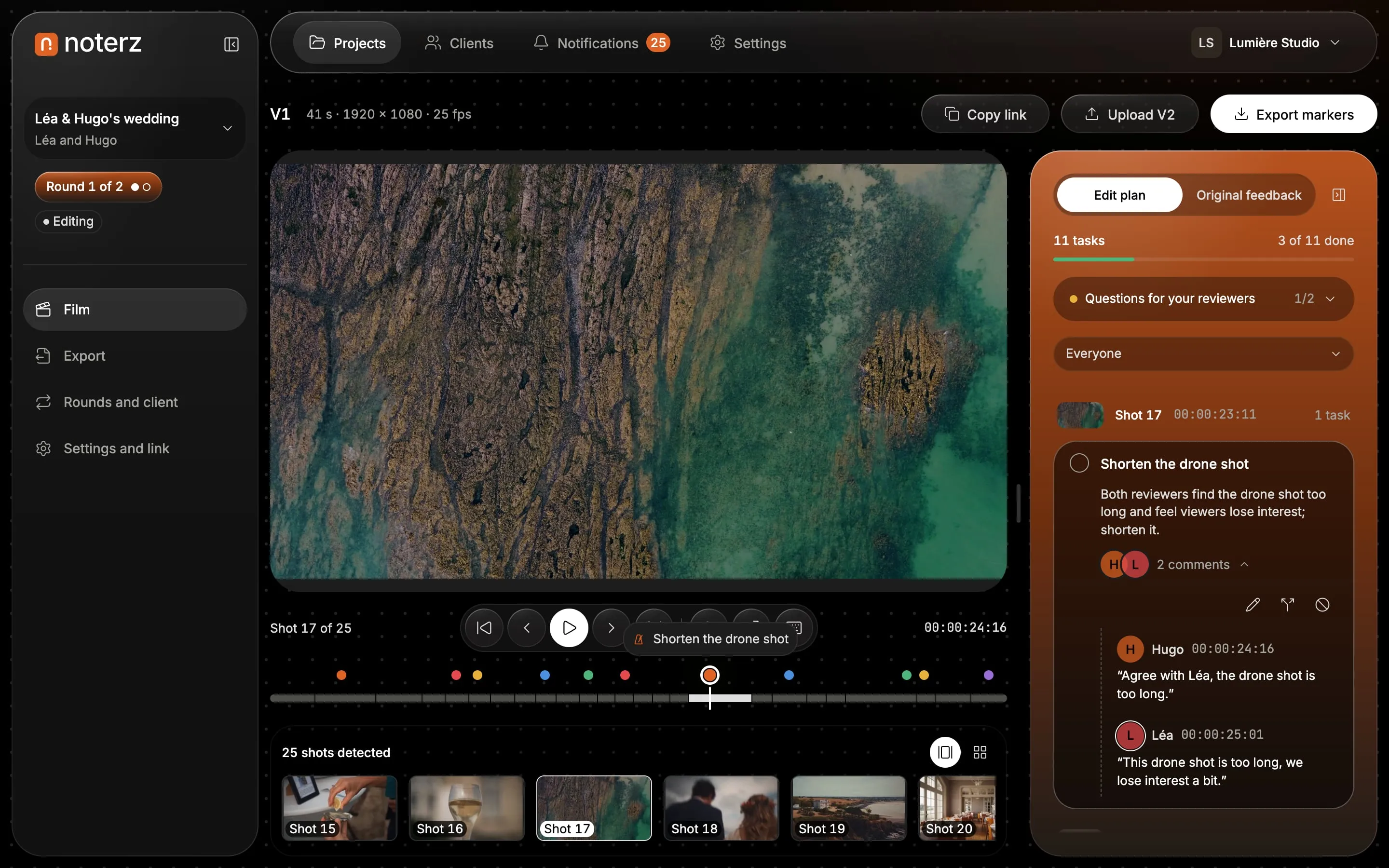
The edit plan: tasks to tick off, in the client's own words
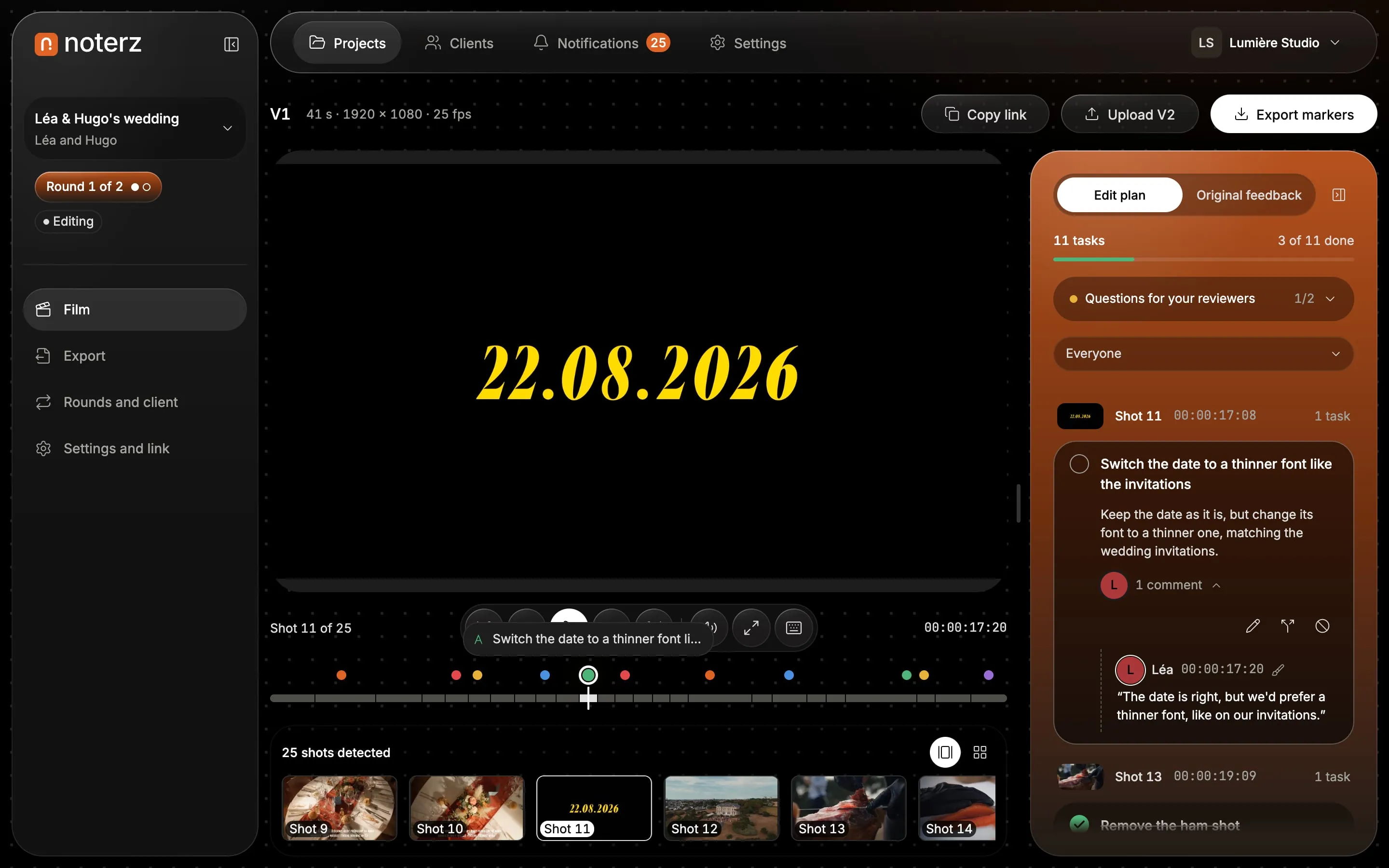
When a round closes, the AI groups the comments by shot and by type into tasks to tick off. Each task keeps the client's original text and its sources: you always know who said what, and at which timecode.
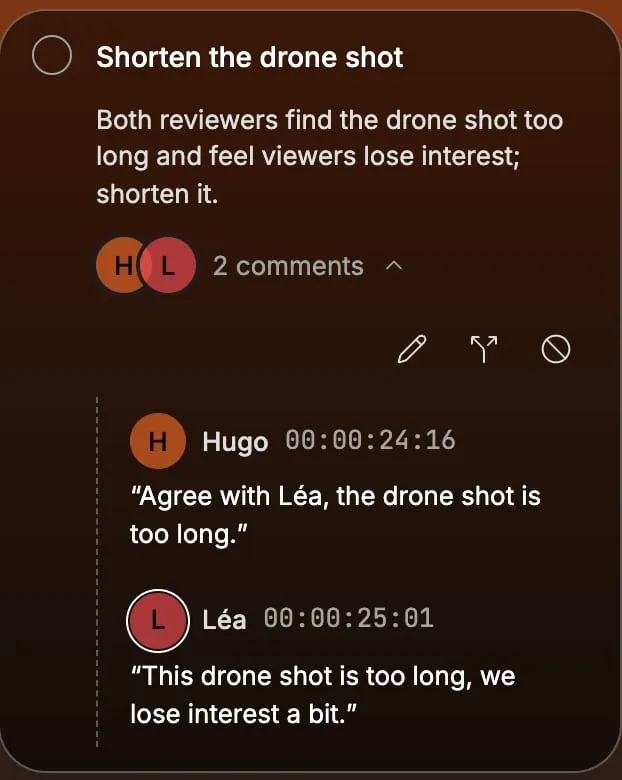
When two reviewers disagree, the edit plan flags it before you have started. Voice notes can be read, drawings can be seen.
- Tasks per shot, to tick off, with the original words and their sources.
- Readable voice notes and visible drawings inside the task.
- Conflicting opinions flagged.
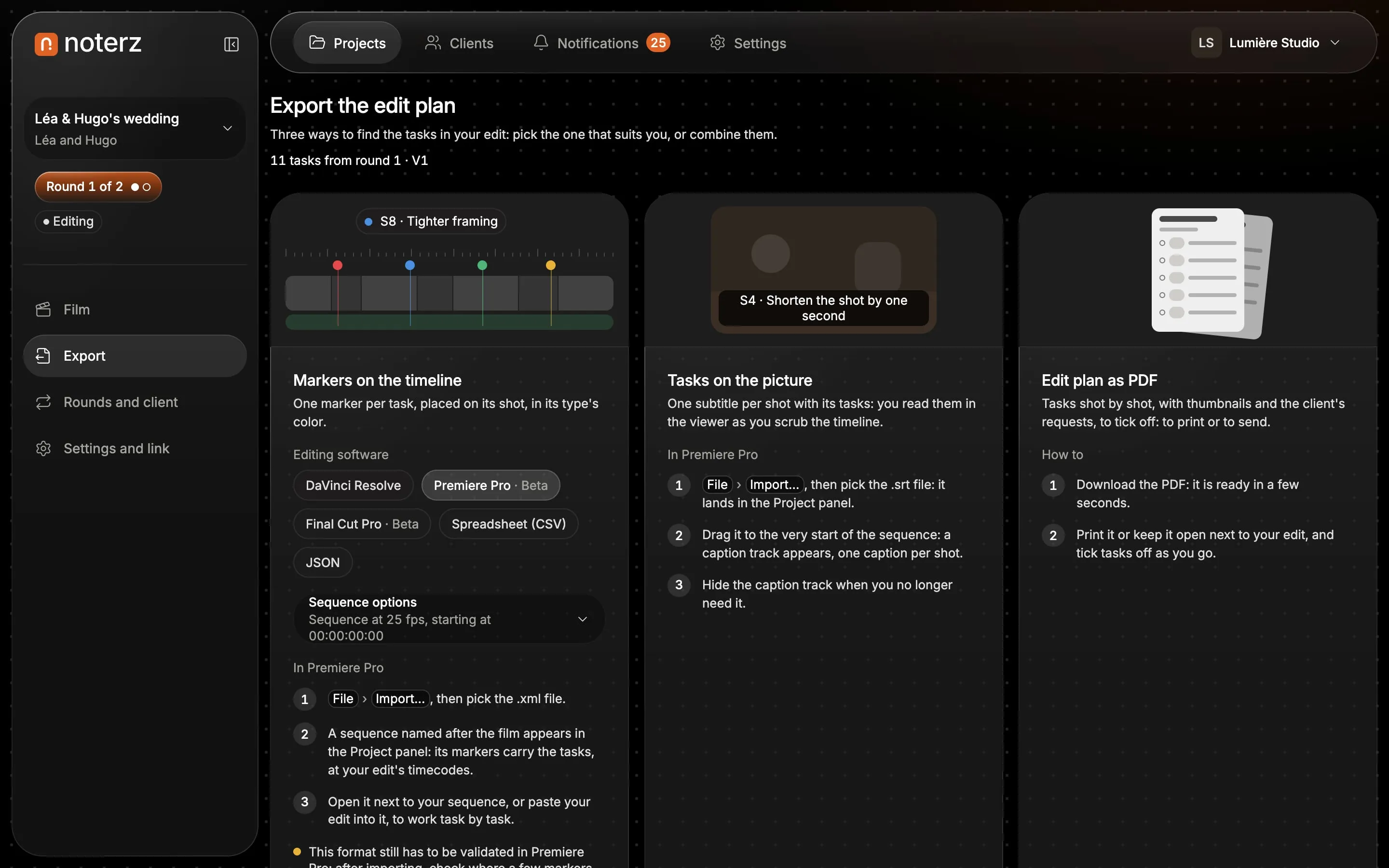
- Exports for your tools: markers, “To do” subtitles, CSV, JSON and PDF.
An AI that does not watch your film
The AI sorts, it does not decide. Its rules fit in one list, and none of them is negotiable.
What it does, when a round closes
- It groups comments by shot and by type into tasks to tick off, always with their original text.
- It asks the client a question when a comment is ambiguous, five at most per round.
- It flags conflicting opinions from several reviewers.
What it never does
- It does not see the video.
- It invents no shot, no timecode and no intention.
- Every task has at least one source.
- It only merges comments from the same shot and the same type.
- A task's priority comes from the intensity the client chose, never from the text.
- It never changes your edit, and a client's text is never rewritten.
- If the analysis fails, the comments become plain tasks: nothing is lost.
Exports
From client feedback to a marker in your editing software
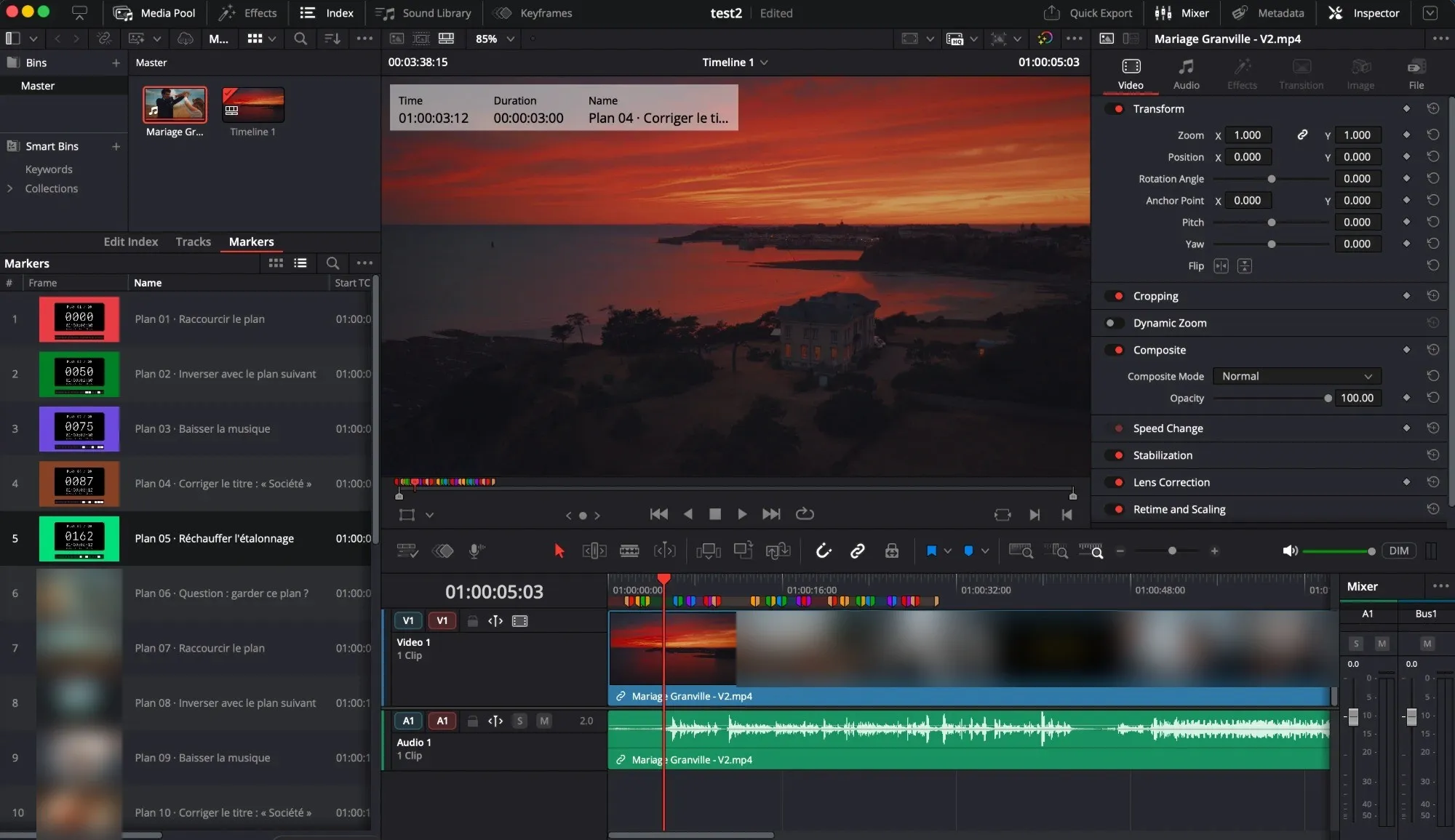
The edit plan's tasks go out as markers in your software, numbered by shot, with the instruction in plain words and the exact frame. For example: “Shot 05 · Warm up the grade”, at 00:00:28:04.
Final Cut Pro is still in beta. For any other tool, there is CSV and JSON.
| Format | Content |
|---|---|
| Premiere Pro | Markers numbered by shot, instruction in plain words, exact frame |
| DaVinci Resolve | Same, with the colour of the feedback type |
| Final Cut Pro (beta) | Same |
| “To do” subtitles | For all three editors |
| CSV, JSON | For any other tool |
| Edit plan PDF | Light A4, in the language of the link |
Delivery
Check V2, approve, sign
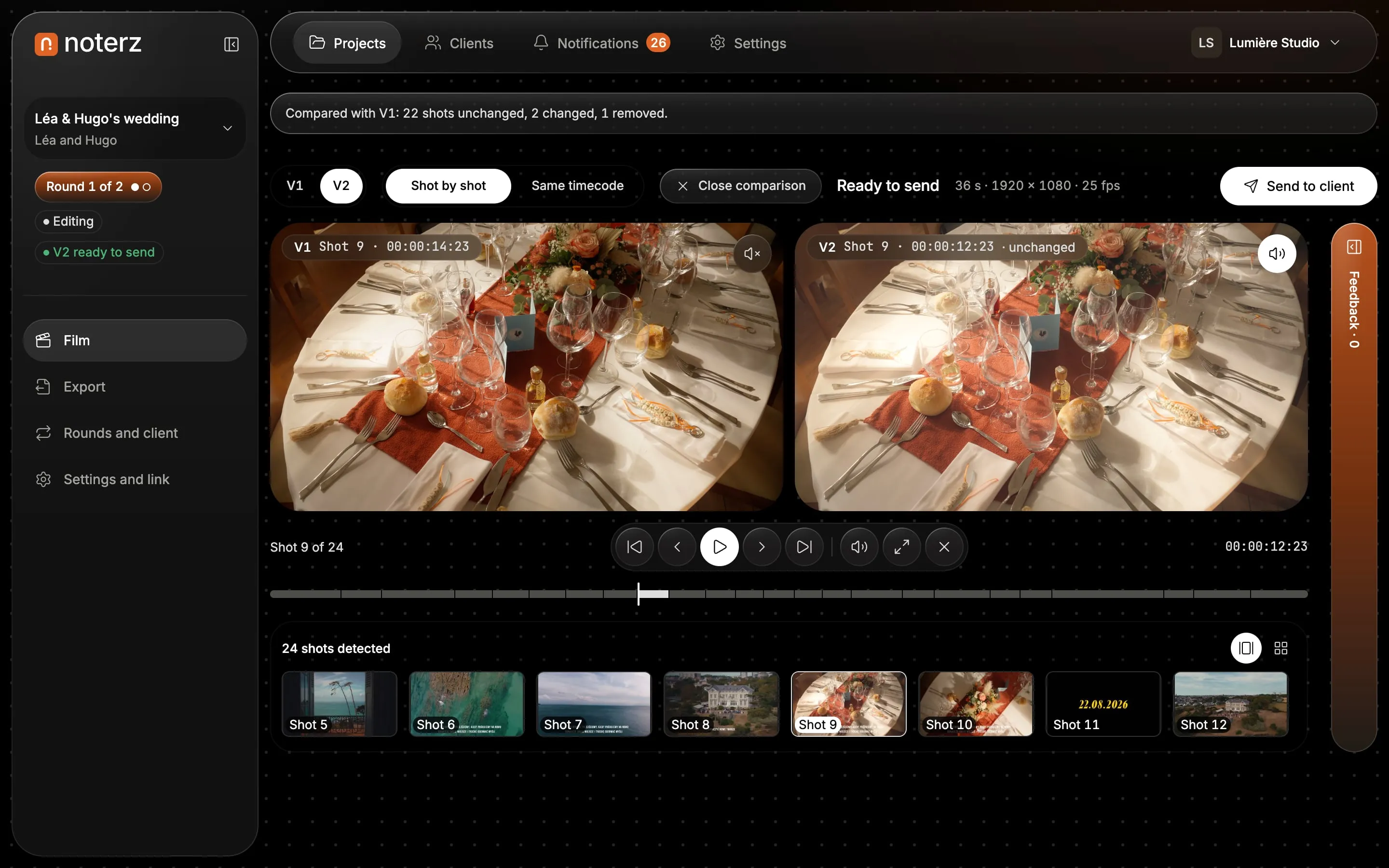
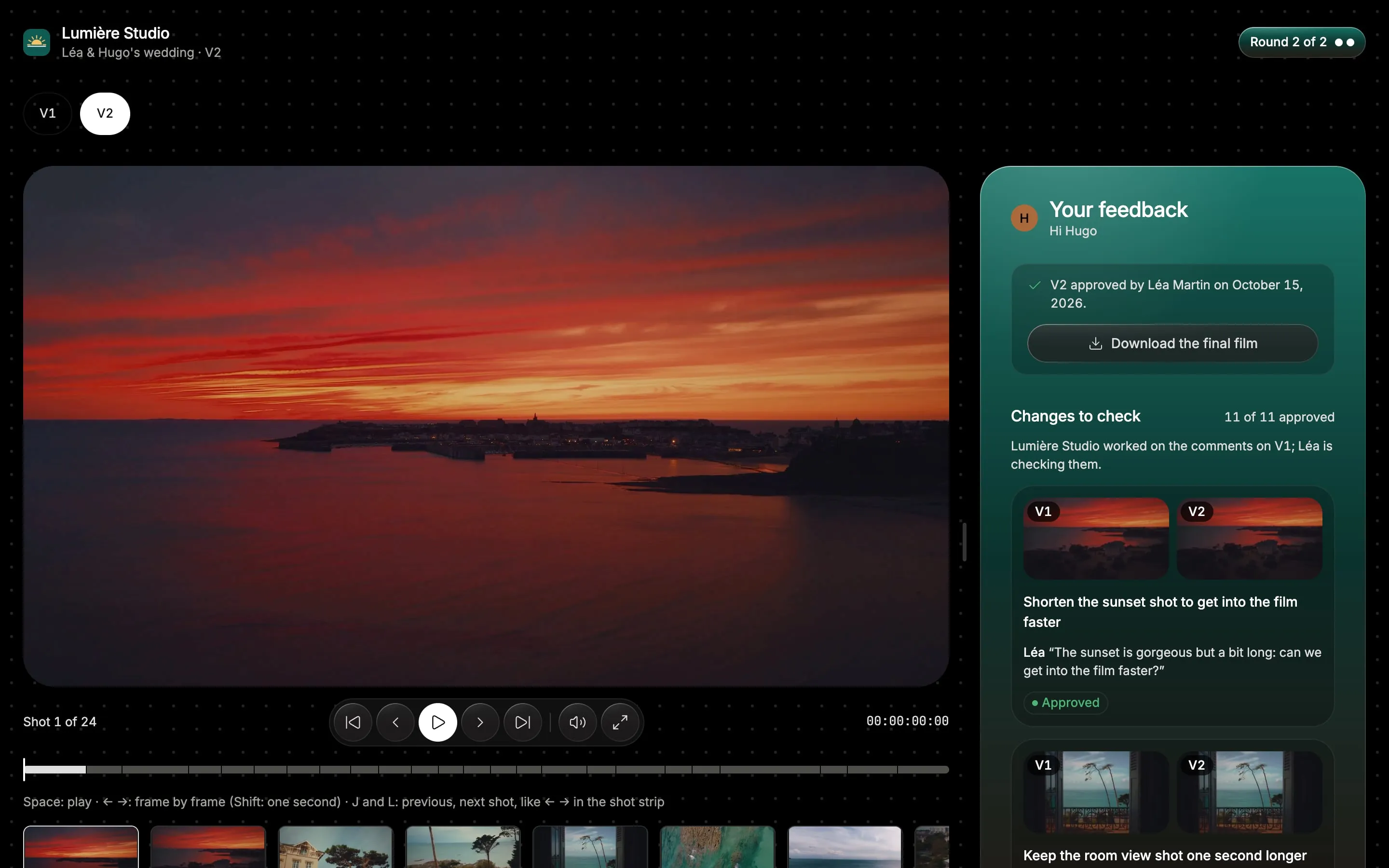
When you deliver V2, your client compares it with V1, side by side and synchronised shot by shot, or both at once. Each fix is approved or commented on.
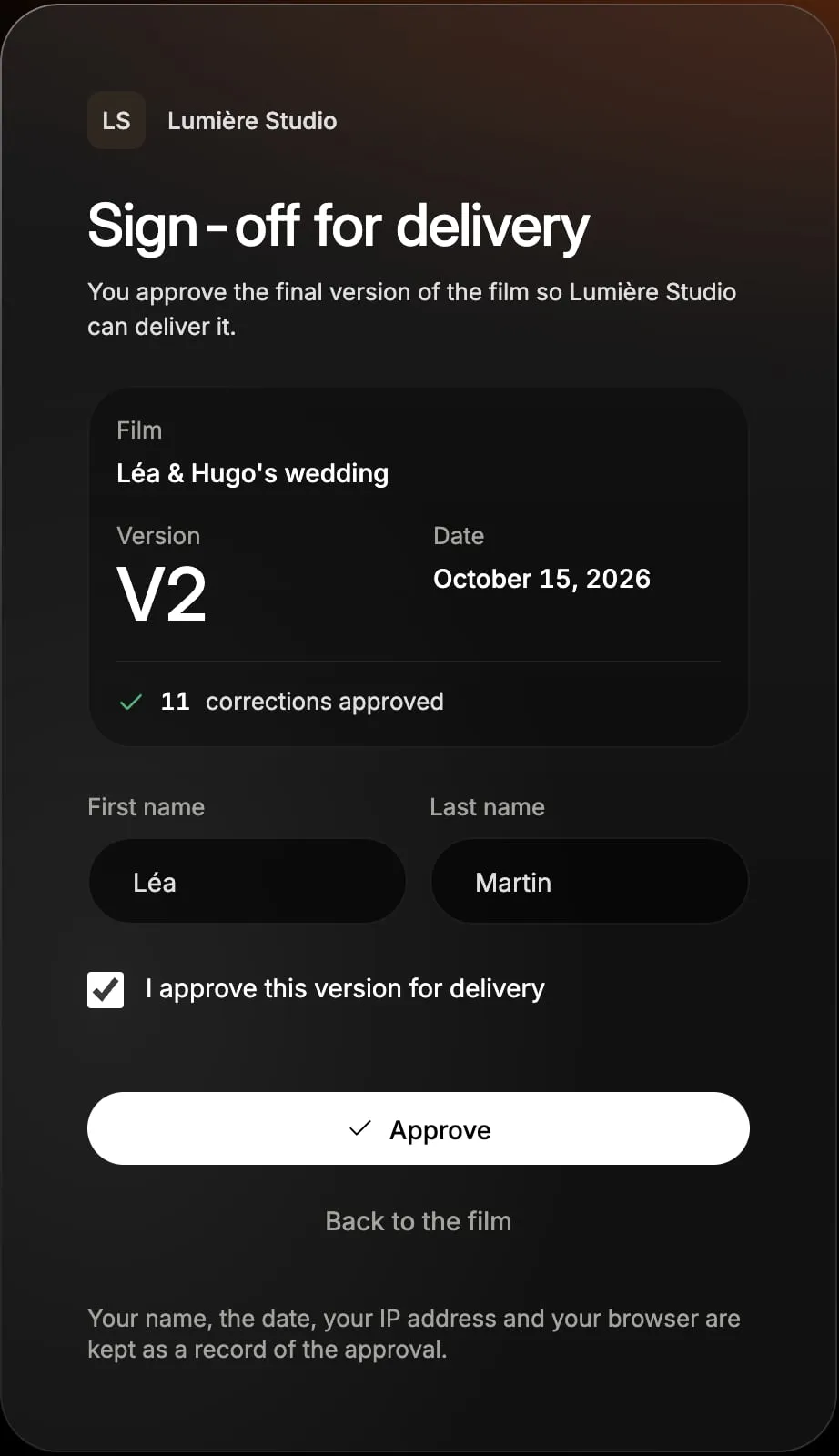
They finish with a delivery sign-off, signed, dated and traced. It is possible at any time, whatever the round, and the final film is then downloaded through a master link.
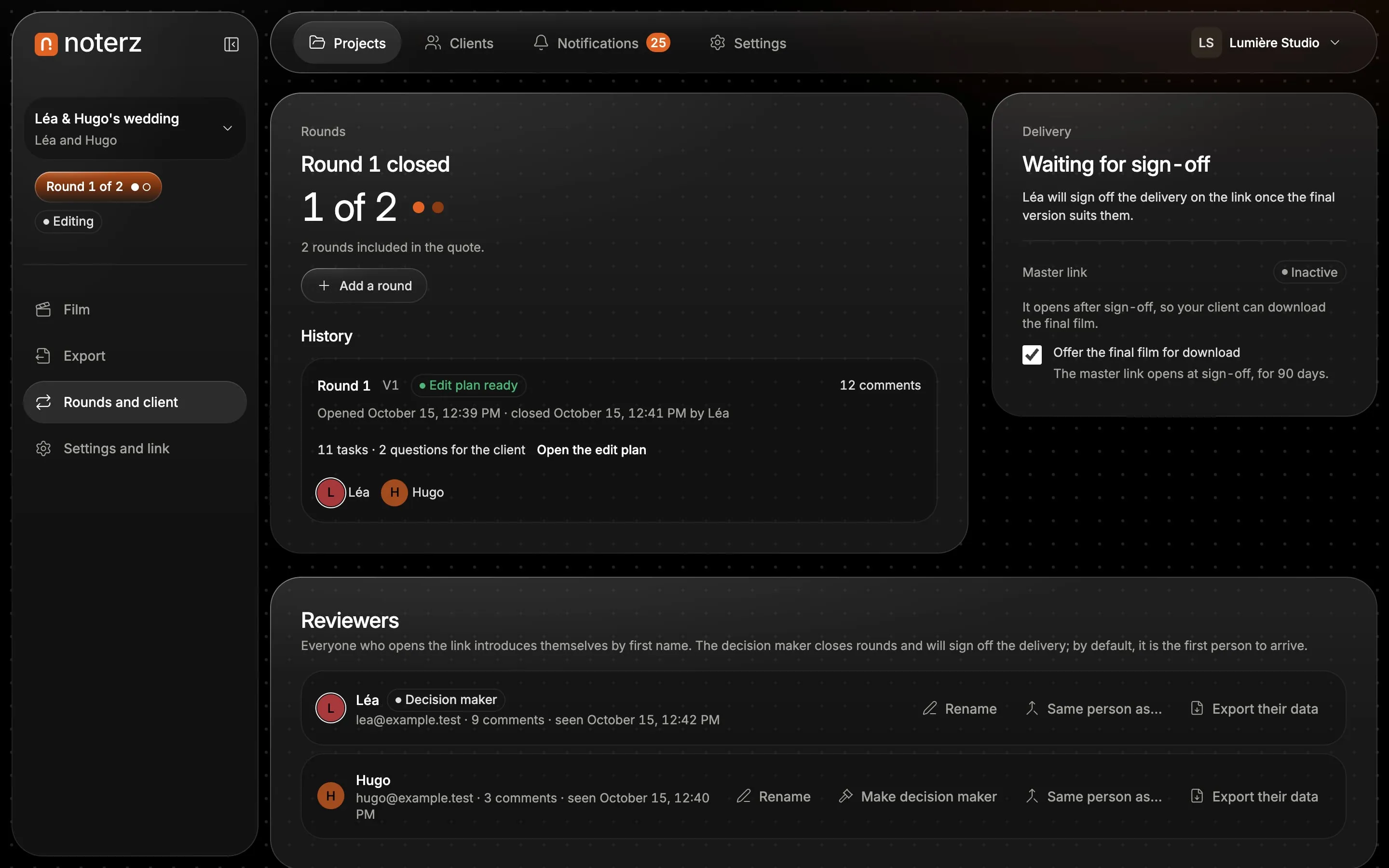
On your side, the “Rounds and client” tab keeps the history, the reviewers and the decision-maker. You can “Add a round” at any time, even after sign-off, and flag a round that is outside the quote.
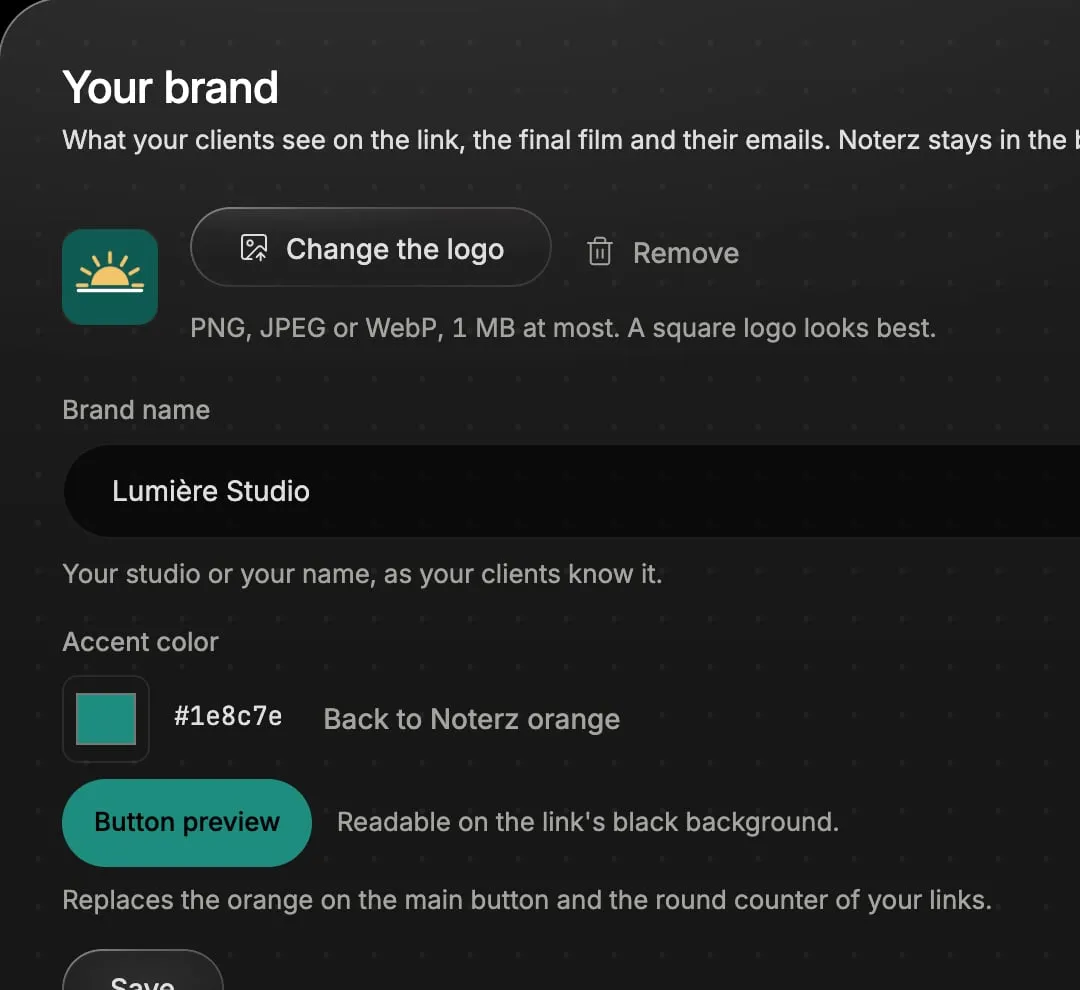
Your brand
On what the client sees, your brand comes first
The editor's name, logo and accent colour appear on the client link, the master link, the emails and the PDF. On everything the client sees, your brand comes before Noterz's.
On the free plan, a discreet “Sent with Noterz” appears under the link. On paid plans, your links carry your brand alone.
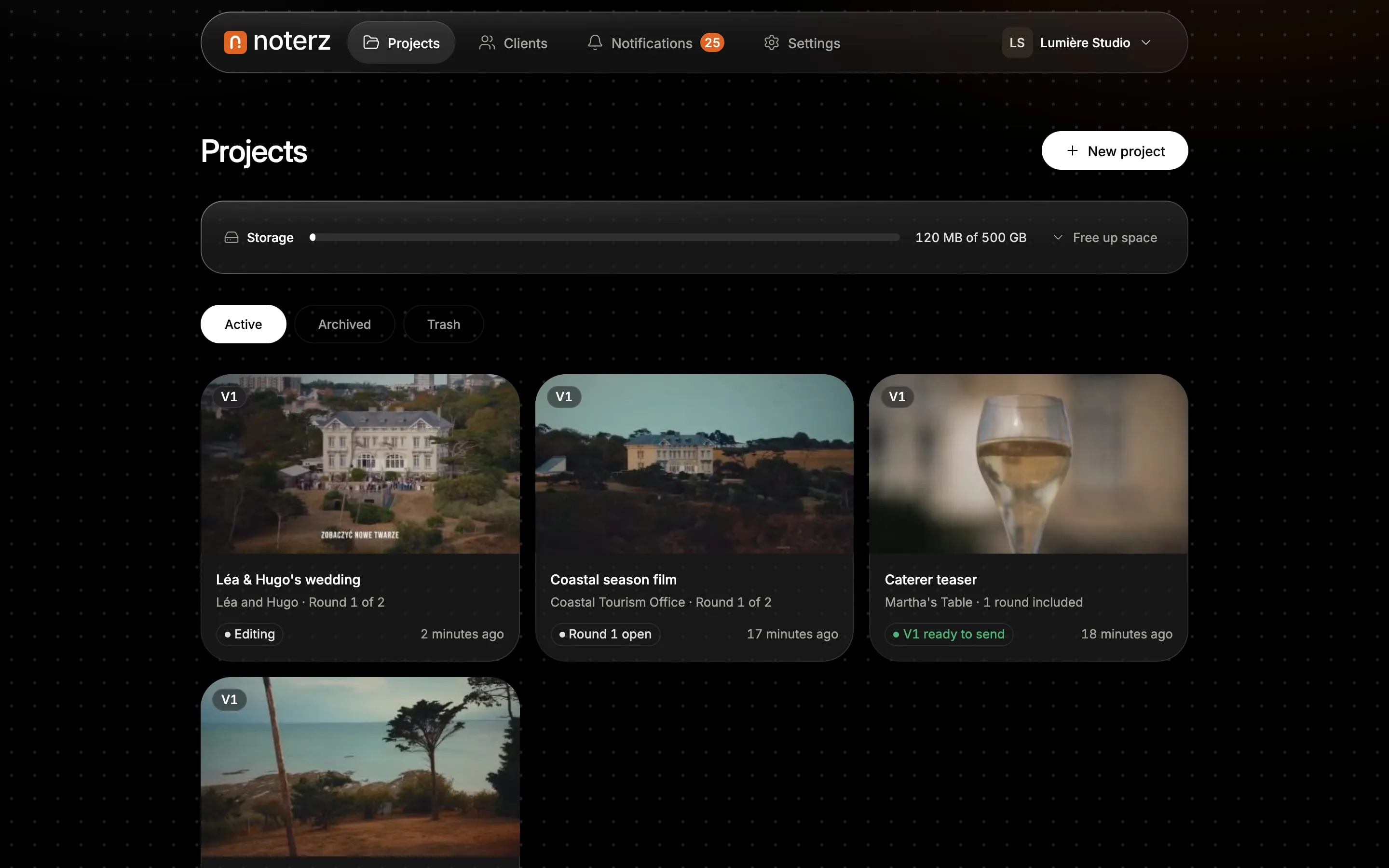
The editor's workspace, built for the editing screen
Everything is managed from a workspace designed for the computer first.
- Projects: list and cards, with the current round, the status and what is waiting.
- Import: chunked upload, processing followed step by step, and automatic shot detection, 37 seconds to split a 21-minute film.
- Frame-accurate player: shot timeline with a coloured dot per comment, shots as a strip or a grid. Vertical videos are supported.
- Two-version comparison with a single playback bar.
- Clients space: editable client files, usual addresses, a pre-filled new project.
- Notifications in a bell and by email, with an optional daily summary at 6 pm. Each type of email can be set.
Your films, how long they are kept, and how they are secured
| What | Retention |
|---|---|
| Approved version and its master link | 90 days after delivery |
| Previous versions | 30 days |
| Project with no activity | 180 days |
| Bin (project or workspace) | 7 days, then fully erased |
You are warned 7 days ahead and can “Extend by 30 days”. Noterz is not an archive: keep your masters.
- Hosted in the European Union: database in Paris, files and processing under EU jurisdiction.
- No third-party tracker on the client link.
- Protected links: 32-byte tokens stored hashed, signed media addresses that expire in under an hour.
- Workspaces isolated from one another, checked in the database on every table.
- Daily database backups, with a successful trial restore.
- An audit on 20 October 2026: 127 forbidden access attempts, all refused, and 53 attempts against production with no session, all refused. It also found a sign-up flaw, fixed the same day.
Made by a video editor
I build Noterz on my own, and I use it for my own films and my own clients. That decides what goes into the product: a comment that cost me an hour to understand becomes a feature, not one more idea.
It is also why the wording stays concrete: figures, not adjectives.
Billed per workspace, not per member
Every feature is in every plan. Your clients never pay and never need an account.
-
Discovery
Try Noterz on a real film, end to end
€0 No card, no time limit
- 1 project at a time
- 5 GB of storage
- Files up to 4 GB and 30 minutes
- “Sent with Noterz” under your links
-
Solo
The freelance editor who delivers several films a month
€19 a month
- 10 projects at a time
- 200 GB of storage
- Files up to 10 GB and 90 minutes
- Your links carry your brand alone
- or €190 a year, two months free
-
Studio
Studios running many projects at once
€39 a month
- 30 projects at a time
- 500 GB of storage
- Files up to 20 GB and 120 minutes
- Your links carry your brand alone
- or €390 a year, two months free
- VAT included. Payment goes through Stripe.
- Cancel at any time from the workspace, active until the end of the paid period.
- Tools like Frame.io charge per member. Here, the whole team fits in one workspace.
Where Noterz stands
The full journey is in production, from client link to delivery sign-off, and sign-ups are open.
Two steps remain for me: delivering a real film end to end with my own clients, and validating the exports in all three editors. Final Cut Pro stays in beta until then.
Frequently asked questions
What is video review and approval software?
It is software where a client leaves comments directly on the video, at a precise moment, instead of writing them in an email, and then approves the final cut. With Noterz, each comment is anchored to an exact frame number and attached to its shot, then sorted into a task in an edit plan.
Does my client have to create an account?
No. They open the link in their browser, type their first name and leave a first comment within seconds. A password on the link is possible, but not required. Your clients never pay.
Does Noterz work with Premiere Pro, DaVinci Resolve and Final Cut Pro?
Yes, through markers numbered by shot, with the instruction in plain words and the exact frame. Final Cut Pro is still in beta. “To do” subtitles exist for all three editors, and CSV or JSON cover any other tool.
What does the AI do, and can it touch my edit?
It sorts comments by shot and type into tasks to tick off, asks at most five questions per round when a comment is vague, and flags conflicting opinions. It does not see the video, invents no shot or timecode, never changes your edit and never rewrites a client's text.
How much does Noterz cost?
The Discovery plan is free, with no card and no time limit, with 1 project at a time and 5 GB. Solo costs €19 a month (€190 a year) for 10 projects and 200 GB, Studio €39 a month (€390 a year) for 30 projects and 500 GB. It is billed per workspace, not per member, and VAT is included.
How is it different from Frame.io or Vimeo?
Frame.io and Vimeo are built for professionals reviewing files together. Noterz is built for a client who is not an editor: typed feedback shot by shot with no account, counted rounds, AI questions on vague comments, markers for all three editors including DaVinci Resolve, a signed delivery sign-off, and hosting in the European Union.
Where are my films hosted, and how long are they kept?
In the European Union: database in Paris, files and processing under EU jurisdiction. The approved version and its master link are kept 90 days after delivery, previous versions 30 days, a project with no activity 180 days. You are warned 7 days ahead, and you keep your masters.
Can my client formally approve the film?
Yes, through a signed, dated and traced delivery sign-off. It is possible at any time, whatever the round, and the final film is then downloaded through a master link.
Can several people review the same film?
Yes. Each reviewer sees the others' comments and can say if they agree, and the decision-maker ends with “I'm done”. When two opinions conflict, the edit plan flags it before you start.
Your next film deserves clear feedback
A free workspace, no card required. Try it on a real film, with a real client.
