What to do with kids drawings when the pile takes over
A child makes hundreds of drawings. Here is what to do with kids drawings without keeping everything or binning everything, and how to keep a trace that lasts.

Lifestyle
Minot
Minot is a kids artwork app that files every drawing in a private museum, with its frame, its wall label and a recording of the artist explaining it.
Free: one child's museum, 50 works, 50 voice memories, preparation, the Timeline, search and a full archive. Premium opens several museums, no limits, private backup, the family gallery and 50 4K restorations a month, at 5.99 € a month or 49.99 € a year. Prints and books are separate purchases.
50 works
the free tier is already a real museum, with no subscription and no account
1 link, 1 code
the family gallery, private, with no account for the grandparents to create
The original stays
preparation and restoration never replace the file you started from
01 Where this started
A child produces dozens of drawings a year. You throw none of them away for three years, then sort them in secret one Sunday evening, with the unpleasant feeling of binning something that mattered.
The known alternative is to photograph them. Except that a photo of a drawing in the camera roll disappears between a screenshot and a picture of a receipt, and you never find it again because you do not know what to search for.
Minot starts from the idea that a child's drawing deserves the treatment a work of art gets: a frame, a wall label, a date, an artist. Not one more photo folder.
Keeping the drawings was never the problem. Finding them again and looking at them is.
02 The museum
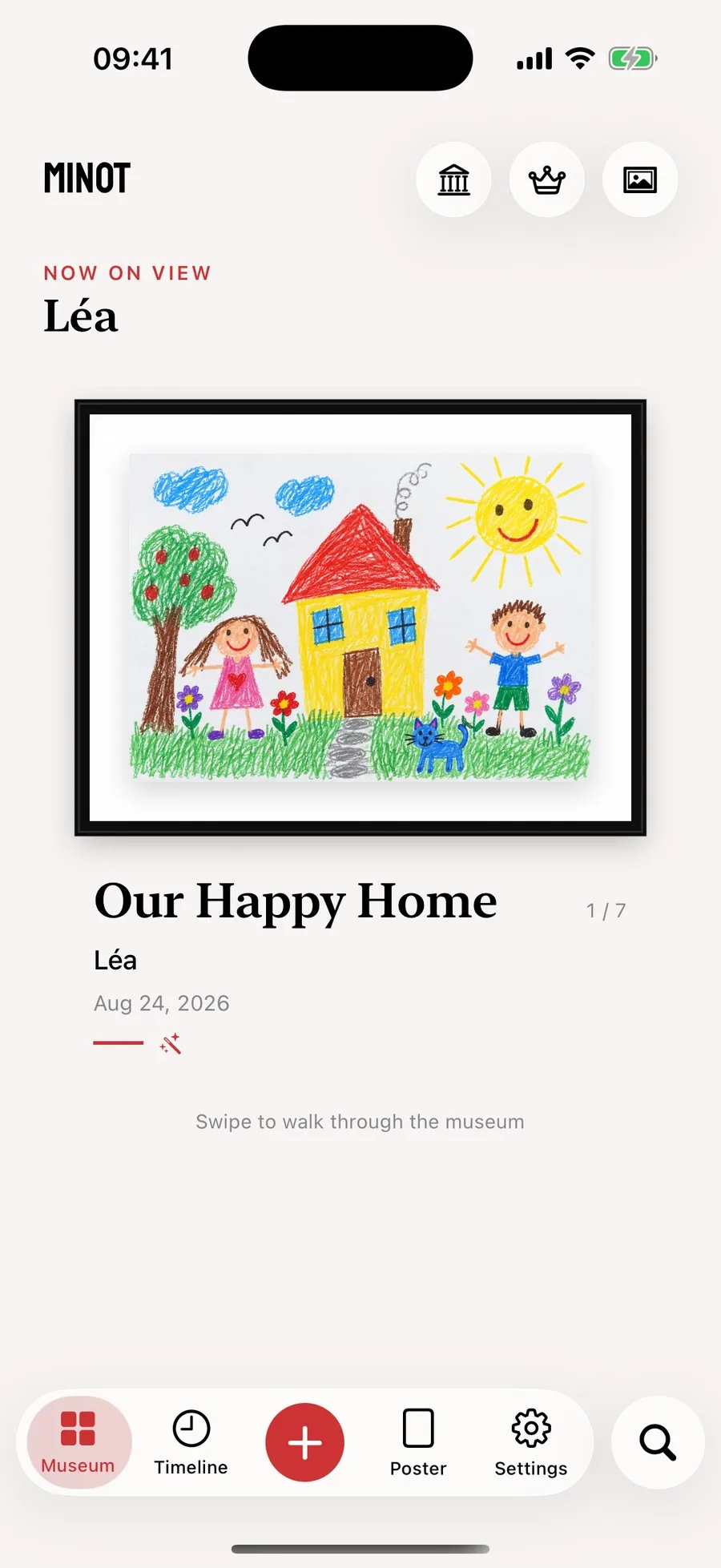
The default view is not a grid of thumbnails, it is a room. One work on screen, black frame, white mount, and you swipe to the next. Title, artist and date sit underneath, like a wall label.
The frame follows the drawing's real orientation: horizontal for a landscape, vertical for a portrait. The image is never stretched to fill a template, and the paper is never recoloured, even when it is yellow, grey or stained.
It is an expensive choice to build and it changes everything: a wall of thumbnails treats drawings as files, a room treats them as works.
A Catalogue view is still there for seeing many at once, but it is not the screen you land on.
03 Getting in
The built-in camera shows a large framing guide, a level driven by the iPhone's sensors, continuous autofocus and tap to focus. Photographing an A4 sheet lying crooked on a table is the most common failure, and it gets fixed at the moment of the shot.
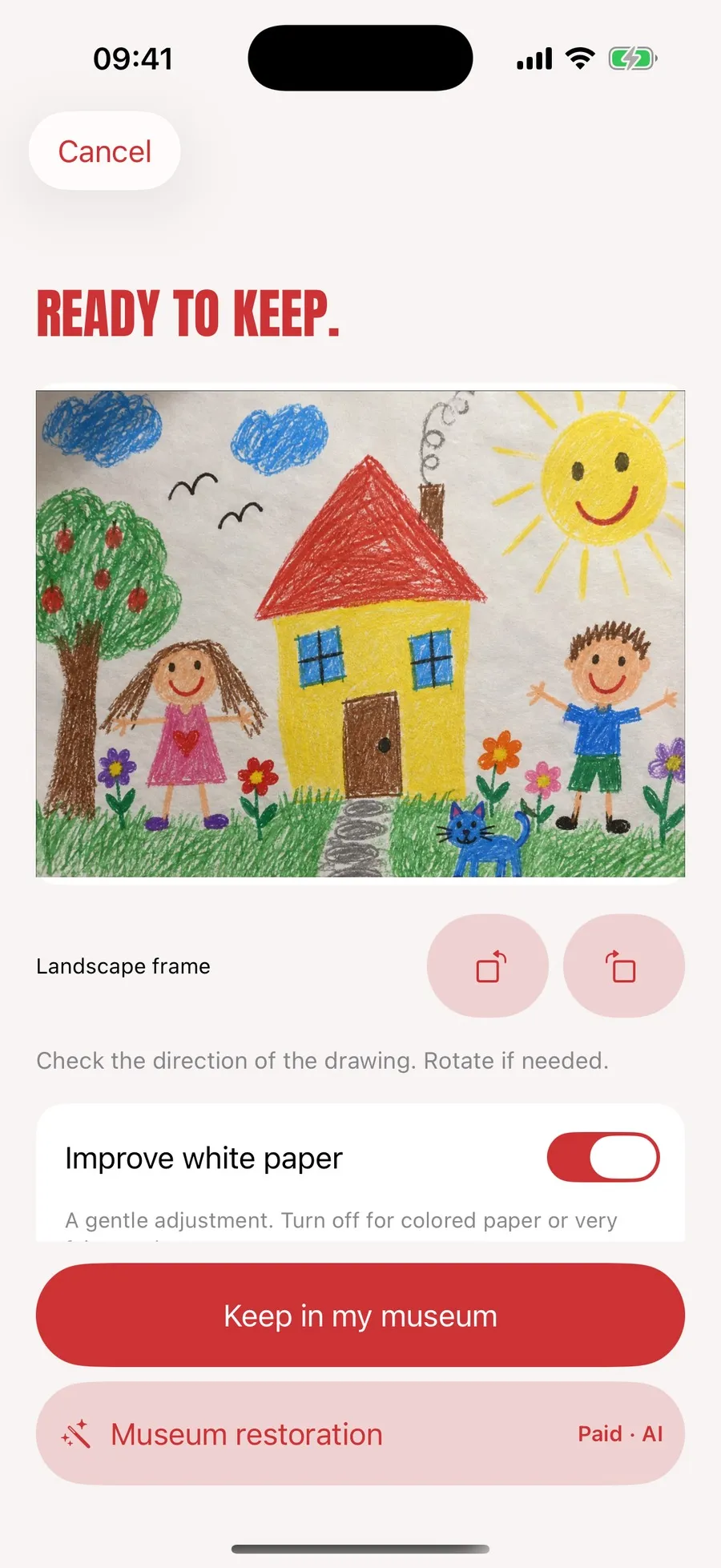
Preparation then happens on the device: sheet detection and straightening, cropping, rotation, white correction. On the screenshot, the Enhance white option carries its own counter-indication, turn it off for coloured paper. That is exactly the kind of precision missing everywhere else.
Up to ten works per import, each saved separately so that one failing file does not take the batch down with it.
04 The label
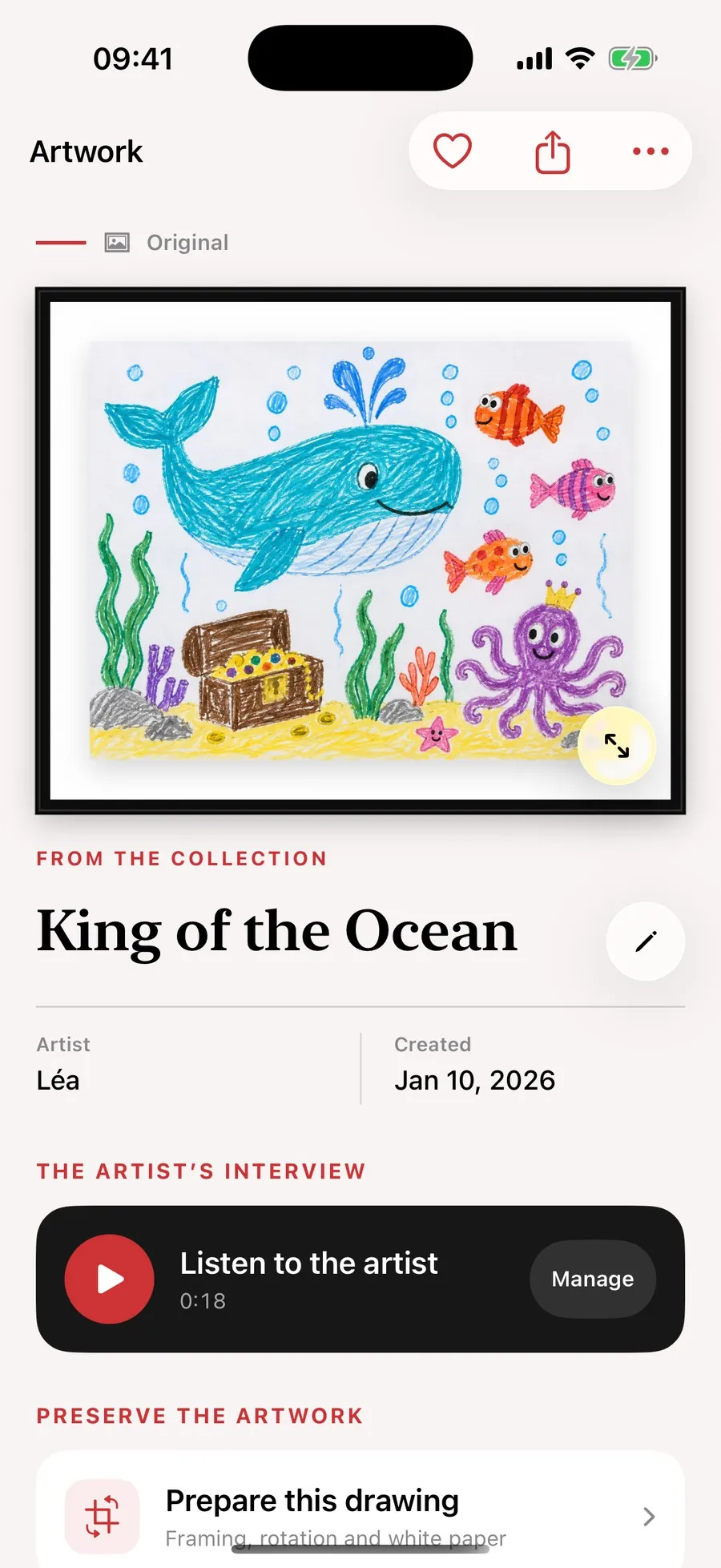
This is the feature I mention first when someone asks what the app does. Any work can carry a voice recording, and it is the child who talks.
Eighteen seconds on the screenshot. What the drawing shows, why the octopus is wearing a crown, when it was made. In fifteen years that recording will be worth more than the drawing.
The rest of the sheet is a wall label: title, artist, creation date, the museum it belongs to, and access to preparation, comparison and the voice memory.
You will remember the drawing. The child's voice explaining it, no.
05 Restoration
Museum restoration is a paid feature producing a 4K version from the cropped image. It asks for explicit consent, sends a copy stripped of private metadata, and works in the background.
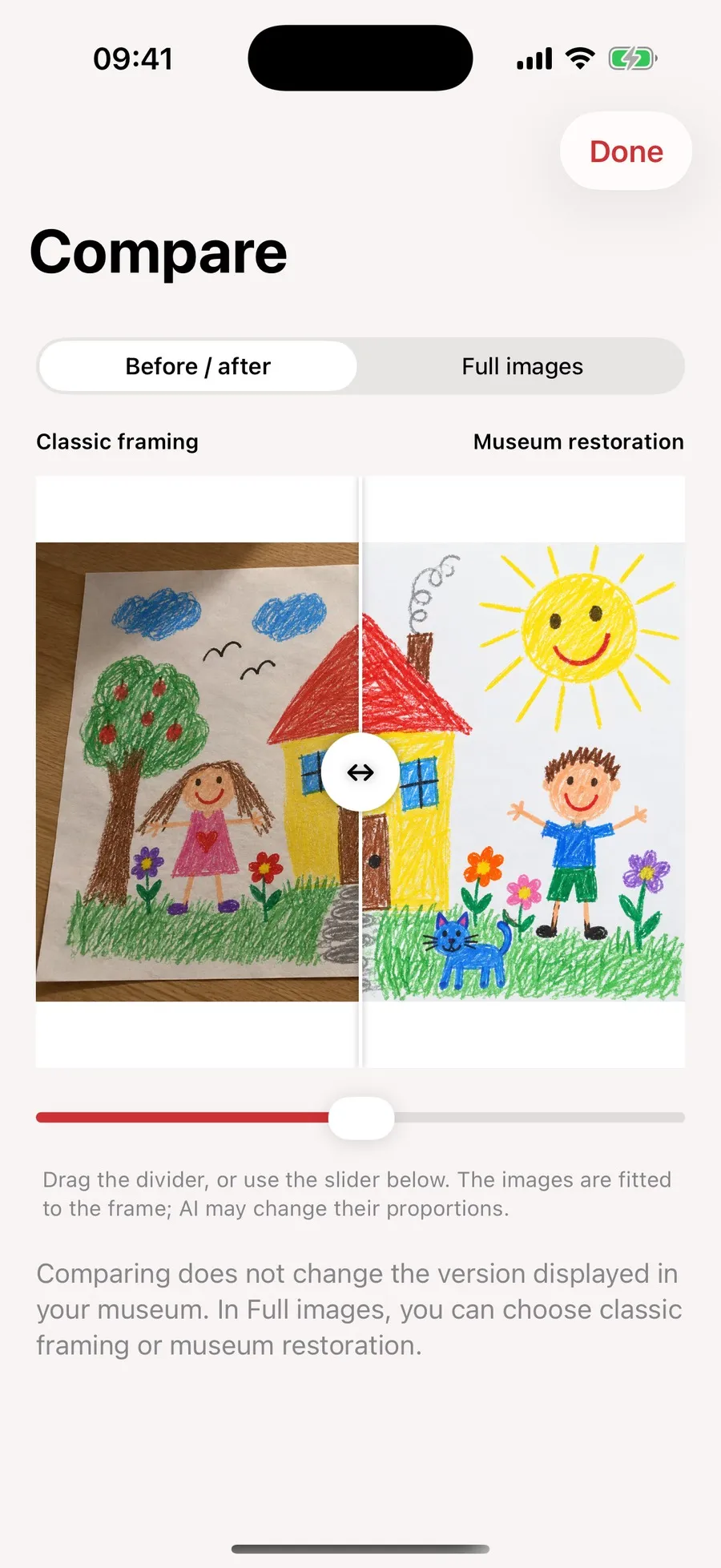
What interests me here is not the AI, it is the Compare screen. A before and after slider, and under it a sentence few apps agree to write: the images are fitted to the frame, and the AI may change their proportions.
On the screenshot the gap is visible: on the left the sheet photographed on a wooden table, on the right a clean version on white. It is prettier, and it is no longer quite the same drawing. The parent decides which one is exhibited, and can go back to the original whenever they like.
06 The family gallery
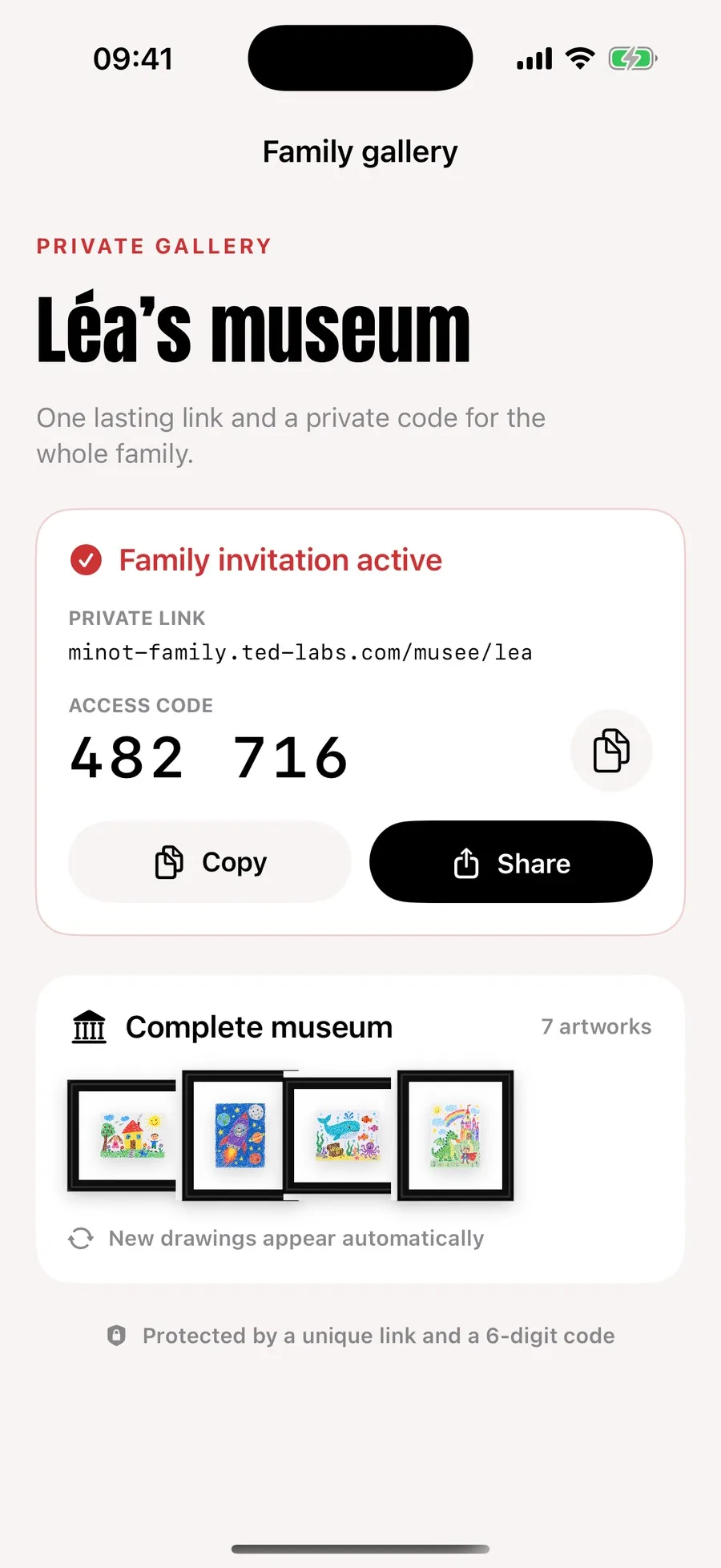
Sharing is where this kind of app usually goes wrong, by manufacturing a public profile and a feed. Minot does the opposite: a child's museum becomes a private web exhibition, protected by a durable link and a six-digit code.
Relatives have nothing to install and no account to create. They type the code and visit one work per room, on a phone or on a computer. New works are added on their own after syncing, deleted ones disappear.
What gets exhibited is deliberately reduced: WebP derivatives at 2,048 pixels, with no private metadata. Originals and 4K restorations are never served directly, and neither the child's full portrait nor their date of birth appears in the gallery.
The link can be revoked and regenerated in one gesture. Voice memories are excluded by default and switched on separately.
07 Prints
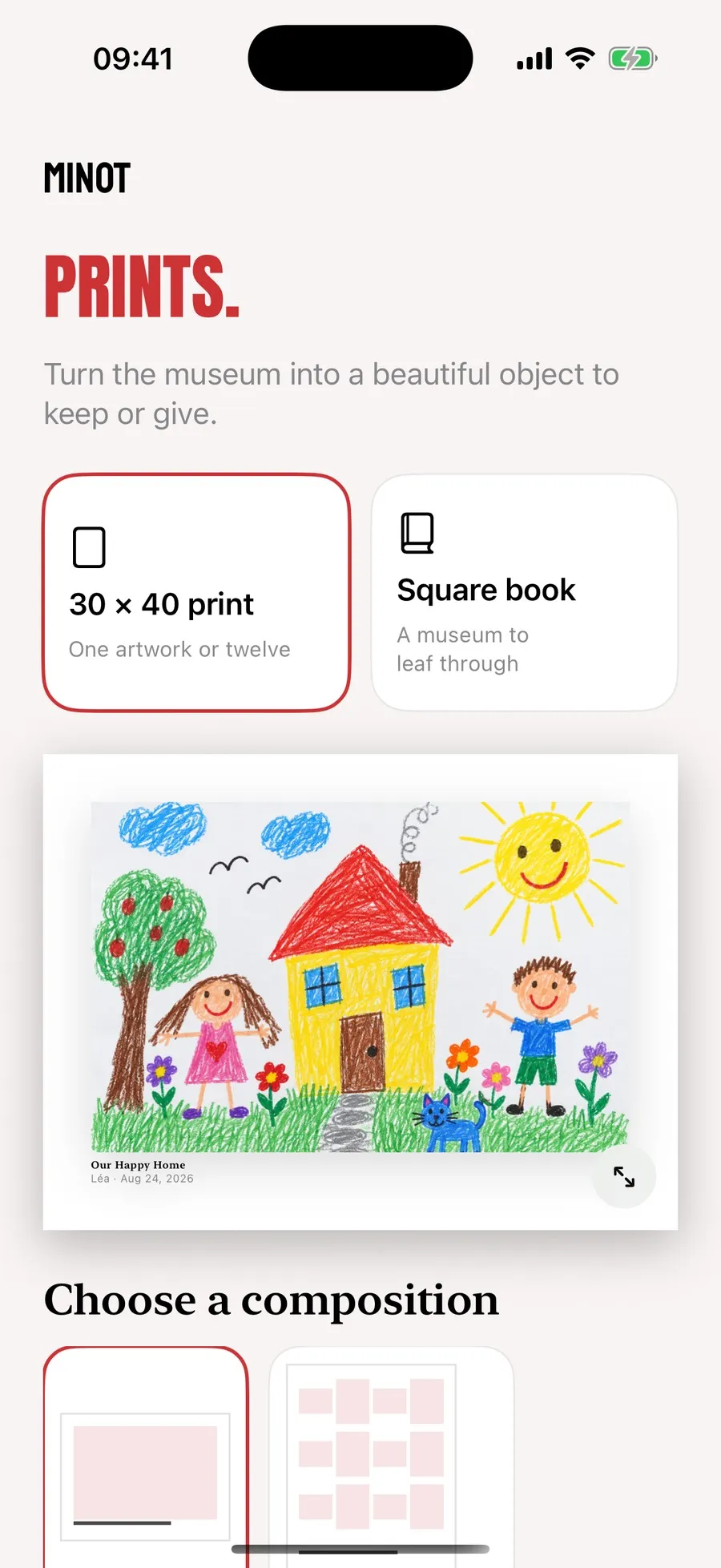
A 30 by 40 fine art print, with one work or twelve in three rows of four. Or a hardback square book at 21 centimetres, up to fifty works, one per page, with three covers to choose from.
The layout follows the same rules as the museum: the drawing's paper is never recoloured, no black frame is printed, and title, artist and date form a block with the work.
It is a one-off purchase, not something the subscription covers, and that is a line I wanted to keep sharp. Minot prepares the file and checks the resolution, Peecho takes the payment, prints and ships.
Horizontal for a landscape, vertical for a portrait. The image is never stretched and the paper never recoloured.
The child explains, the recording stays attached to the work. Fifty of them on the free tier.
The original, the local preparation and the restoration coexist. Exhibit whichever you want, go back whenever you want.
One link and a six-digit code. No public profile, no feed, no account for relatives to create.
It does not grade. No score, no ranking, no comparison between two children or between two drawings. That sounds obvious, and yet half the apps built for parents end up introducing a progression, a badge or a statistic. A child’s drawing has no performance.
It does not publish either. There is no profile, no feed, no public account, and nothing exists online until an adult has created a family gallery and passed on a code.
Finally, it does not replace paper. A scanned drawing is still a photo of a drawing, and the original sheet keeps a texture, a grain and creases no sensor reproduces. Minot exists so you can throw some of them away without regret, not so you can pretend the drawer is pointless.
This is the rule the app is built around, and it costs storage.
Each work can exist in three states: the original photo, the version prepared on the device with its crop and white correction, and the restoration produced by the AI. All three coexist. The one exhibited in the museum is a choice, not a destruction.
The reason is simple. Automatic cropping gets things wrong, white correction sometimes eats a deliberately grey background, and a restoration shifts proportions. If each of those operations replaced the previous file, one bad sheet detection would be enough to lose the drawing as it was actually made.
The free tier is not a demo. One museum, fifty works, fifty voice memories, the full preparation flow, the Timeline, search, and an archive you export whenever you like. A child who draws a lot gets a comfortable year out of it.
The subscription answers two different needs: duration and family. Several children, no more caps, a private backup that does not eat into your iCloud, recovery onto a new phone, and the gallery the grandparents open with a code.
Prints and books sit elsewhere. They are one-off purchases, they are not part of the subscription and they do not go through StoreKit. Mixing a digital subscription with buying a physical object is the surest way to make a bill unreadable.
Minot is not published yet. The screenshots on this page come from version 1.0, on Lea’s demonstration museum, seven works.
What is left is submission, and a decision I have not made: the bundle identifier and the app’s folder name still carry one letter too many, inherited from the prototype. The product name is spelled Minot.
This page will be updated on release day, with the download link in place of this sentence.
The first museum is local and asks for no account. What leaves afterwards depends entirely on what you trigger: private backup, the family gallery, an AI restoration, a print order. The detail of each of those routes, what each provider receives and what stays on the iPhone, is in the Minot privacy policy.
The rules of the service, the line between the subscription and the physical products, production times and the legal notice are in the terms of use and sale.
You photograph the drawing with the app's guided camera, which straightens the sheet and corrects the white on the iPhone. The work then enters a museum in the child's name, with a title, a date and an artist, and appears in a black frame with a white mount. You can attach a recording of the child explaining the drawing.
Not to begin with. The first museum is created locally and works with no account. Signing in with Apple becomes necessary for the subscription, the family gallery and print orders.
No. Minot has no public gallery, no profile and no feed. Nothing leaves for a server without an explicit action on your part, whether that is switching on backup, creating a family gallery or starting a restoration.
A private web exhibition, opened with a link and a six-digit code, with no account to create. They see the works as 2,048 pixel derivatives, with no private metadata, without the child's full portrait or date of birth. Voice memories are excluded by default.
It can slightly change a line, a colour or a proportion, and the app says so on screen rather than keeping quiet about it. That is why a Compare tool exists, with a before and after slider. The original and the prepared version stay available, and you can return to either at any time.
One child's museum, fifty works, fifty voice memories, the guided camera, preparation, the Museum and Catalogue views, the Timeline, favourites, search, and a full archive you can export. Enough to run a real museum without ever paying.
Several children's museums, unlimited works and voice memories, automatic private backup with 5 GiB per family, recovery onto a new iPhone, the family gallery and fifty 4K restorations every thirty days. It costs 5.99 € a month or 49.99 € a year, with family sharing.
No, and that is deliberate. A 30 by 40 print or a square book are one-off purchases you can order without a subscription. Minot prepares the file and checks the resolution, then Peecho handles payment, printing and delivery.
Coming soon
Minot is coming very soon.